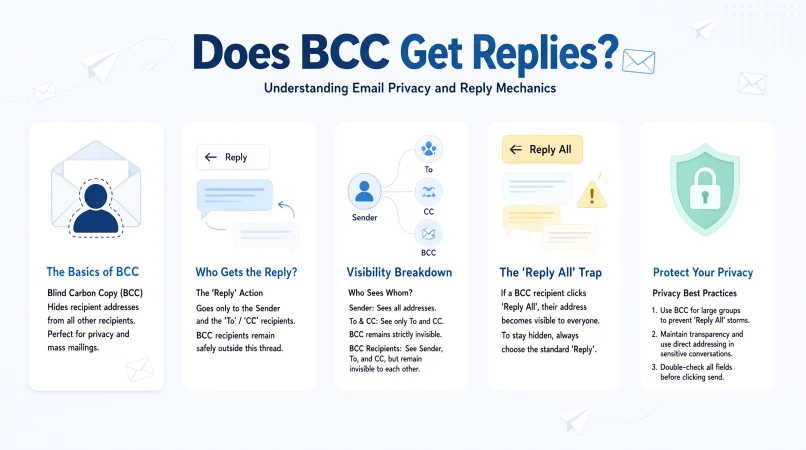
Quick Answer: Yes, BCC recipients can reply to an email, but their reply usually goes only to the sender unless they choose “Reply All,” which may reveal their presence to other recipients. Understanding BCC helps you manage email privacy and respond confidently in personal and professional situations.
Ever sent an email using BCC and wondered whether the hidden recipients could reply? Or perhaps you received an email where your address was tucked away in the BCC field, and now you’re unsure what happens if you hit Reply All. You’re not alone! Email features can feel surprisingly confusing, especially when work messages, group projects, client conversations, and personal plans are involved.
The question “does BCC get replies” matters because it affects privacy, communication, and professional etiquette. BCC stands for Blind Carbon Copy, allowing you to send an email to someone without showing their address to other recipients. However, the way that person responds can make a real difference.
Whether you’re emailing colleagues, organizing an event, or keeping a conversation discreet, knowing how BCC works helps you avoid awkward inbox moments. Let’s break it down with clear answers, practical examples, and useful email tips.
1. Simple and Direct Answers
- Yes, BCC recipients can reply. Example: Use this explanation when someone asks whether a hidden recipient can respond. Meaning: BCC recipients can send a normal reply to the sender.
- Yes, but the sender usually receives it privately. Example: Explain what happens when a BCC recipient clicks Reply. Meaning: A standard reply normally goes only to the original sender.
- BCC does not block replies. Example: Clarify a common misunderstanding about hidden recipients. Meaning: BCC controls address visibility, not the ability to respond.
- You can reply even if your address is hidden. Example: Reassure someone who received a BCC email. Meaning: Hidden recipients can still participate in the conversation.
- Your reply depends on which button you choose. Example: Explain the difference between Reply and Reply All. Meaning: The response option determines who receives the message.
- Reply sends your message to the sender. Example: Recommend the standard reply option for private communication. Meaning: A normal reply generally stays between you and the sender.
- Reply All can reveal your presence. Example: Warn a BCC recipient before they respond to a group email. Meaning: Reply All may expose the hidden recipient’s identity.
- BCC keeps your address hidden from other recipients. Example: Describe why someone might use BCC for a mailing list. Meaning: Other original recipients cannot see your address in the BCC field.
- The sender can see the BCC list. Example: Explain who knows that you were included. Meaning: BCC hides recipients from one another, not from the sender.
- BCC is about privacy, not silence. Example: Correct someone who thinks hidden recipients cannot communicate. Meaning: BCC allows replies while limiting address visibility.
- You do not need to be visible to respond. Example: Explain how BCC works during a group announcement. Meaning: Being hidden from other recipients does not prevent a reply.
- Check your recipients before sending. Example: Give a quick tip before someone emails a large group. Meaning: Reviewing the To, CC, and BCC fields helps prevent mistakes.
2. Funny Responses
- BCC means invisible, not unavailable. Example: Use this when a friend thinks hidden recipients cannot reply. Meaning: Being hidden does not mean being unable to respond.
- I’m undercover, not offline. Example: Joke about receiving a BCC email at work. Meaning: You can stay hidden from other recipients and still answer.
- My email address is wearing an invisibility cloak. Example: Make a lighthearted comment about BCC privacy. Meaning: BCC conceals your address from other recipients.
- I can reply without making a grand entrance. Example: Describe a discreet response to a group email. Meaning: A normal reply lets you communicate privately with the sender.
- BCC: the email version of a secret side door. Example: Explain the feature to someone who enjoys playful comparisons. Meaning: BCC allows discreet inclusion in an email.
- Hidden in the inbox, active in the conversation. Example: Use this as a memorable summary of BCC. Meaning: Hidden recipients can still engage.
- I’m the plot twist nobody sees in the recipient list. Example: Joke about being secretly copied on a message. Meaning: Other recipients generally cannot see your BCC status.
- Invisible address, fully functional reply button. Example: Respond to a friend who is confused about BCC. Meaning: Privacy does not disable email replies.
- BCC is stealth mode for email, not airplane mode. Example: Explain the feature with a tech-inspired joke. Meaning: BCC hides addresses without disconnecting recipients.
- The sender knows I’m here; the group doesn’t. Example: Describe your role in a confidential group email. Meaning: The sender sees the BCC recipient, while other recipients generally do not.
- I’m in the email, just not on the guest list. Example: Make a joke about being hidden from the visible recipient list. Meaning: BCC keeps your address out of view for other recipients.
- The reply button didn’t get the memo about secrecy. Example: Use this when discussing BCC’s limitations. Meaning: Replying is allowed, but choosing Reply All can expose your presence.
3. Professional Responses
- Yes, BCC recipients may respond directly to the sender. Example: Use this in a workplace email discussion. Meaning: A standard reply usually reaches the sender only.
- BCC does not prevent recipients from replying. Example: Clarify the feature during team training. Meaning: BCC affects recipient visibility rather than response permissions.
- A standard reply generally preserves recipient privacy. Example: Explain the safest default for a BCC recipient. Meaning: Reply usually avoids sending the response to the original group.
- Please use Reply rather than Reply All when appropriate. Example: Give guidance for confidential group correspondence. Meaning: The standard reply helps limit unnecessary disclosure.
- The sender can view the BCC recipients. Example: Explain the feature to a new employee. Meaning: BCC is hidden from other recipients, not from the sender.
- BCC is useful for protecting recipient email addresses. Example: Recommend it for announcements to external contacts. Meaning: It reduces the visibility of addresses among recipients.
- A BCC recipient may reply without notifying the entire group. Example: Describe private follow-up after a company announcement. Meaning: A standard reply normally reaches the sender alone.
- Reply All may disclose your involvement in the email. Example: Warn colleagues before they respond to a mailing list message. Meaning: The wrong response option can expose a hidden recipient.
- Please verify the recipient list before responding. Example: Share an email etiquette reminder. Meaning: Checking recipients helps avoid accidental disclosures.
- The appropriate response depends on the intended audience. Example: Explain how to choose between Reply and Reply All. Meaning: The audience should determine the response option.
- BCC should be used with clear privacy expectations. Example: Discuss confidential business correspondence. Meaning: Hidden recipients should understand the limits of BCC.
- When confidentiality matters, reply only to the sender. Example: Advise someone handling sensitive business communication. Meaning: A direct reply reduces the risk of revealing hidden recipients.
4. Sarcastic Responses
- Apparently, invisible people can still type. Example: Use this with a friend who misunderstands BCC. Meaning: Hidden recipients can send replies.
- The address is hidden, not the keyboard. Example: Make a witty observation about email privacy. Meaning: BCC does not prevent typing or sending messages.
- BCC isn’t a witness protection program. Example: Joke about the limits of email anonymity. Meaning: BCC conceals addresses from recipients but does not guarantee complete secrecy.
- Shocking news: the Reply button still works. Example: Respond playfully to someone asking whether BCC recipients can answer. Meaning: BCC does not disable the reply function.
- Secret recipient, ordinary email privileges. Example: Summarize BCC in a sarcastic tone. Meaning: Hidden recipients retain normal email functionality.
- Stealth mode doesn’t cancel communication. Example: Explain why BCC recipients can respond. Meaning: Concealment and communication can happen together.
- The inbox has secrets, but it isn’t magic. Example: Correct an exaggerated belief about email privacy. Meaning: BCC hides addresses from other recipients but has limitations.
- Hidden in the header, not trapped in silence. Example: Use a witty explanation in a casual chat. Meaning: BCC recipients can still respond normally.
- Email privacy comes with a Reply All warning label. Example: Remind someone to check their response option. Meaning: Reply All can reveal a hidden recipient’s identity.
- The sender knows; the rest are guessing. Example: Describe the visibility difference between the sender and other recipients. Meaning: The sender can see BCC addresses.
- BCC hides the address, not every possible clue. Example: Explain why BCC is not a guarantee of anonymity. Meaning: Message content or response behavior can reveal someone’s involvement.
- Congratulations, you’ve discovered email’s least mysterious mystery. Example: Tease a friend who is overthinking BCC. Meaning: The feature is straightforward once you understand its purpose.
5. Educational Responses
- BCC stands for Blind Carbon Copy. Example: Use this when explaining the abbreviation to a beginner. Meaning: It lets you include recipients without displaying their addresses to other recipients.
- BCC recipients can receive and reply to emails. Example: Explain the feature during a basic email lesson. Meaning: BCC does not remove ordinary email functions.
- The sender can see the BCC field. Example: Clarify who has access to the recipient list. Meaning: The sender knows who was included as a blind copy.
- Other original recipients cannot see the BCC list. Example: Explain the difference between CC and BCC. Meaning: BCC conceals those addresses from other recipients.
- Reply normally sends a response to the sender. Example: Teach someone which button to use for a private response. Meaning: The standard reply typically addresses the original sender.
- Reply All sends a response to the visible reply audience. Example: Explain the button before a recipient responds. Meaning: It can include the sender and original visible recipients, depending on the message and email system.
- Reply All may expose a BCC recipient’s address. Example: Warn someone who received a blind copy. Meaning: A response can reveal their identity or participation.
- BCC and CC serve different purposes. Example: Help a beginner choose the correct field. Meaning: CC displays recipients, while BCC conceals their addresses from other recipients.
- BCC is useful for group announcements. Example: Explain its role in newsletters or event invitations. Meaning: It can protect recipients’ email addresses from one another.
- BCC does not guarantee complete confidentiality. Example: Discuss its limitations in a workplace setting. Meaning: Messages can be forwarded or disclosed in other ways.
- Email systems may handle recipient details differently. Example: Explain why someone should check their email application’s behavior. Meaning: Exact response and header behavior can vary by platform.
- Always check the recipients before pressing Send. Example: Share a practical email safety tip. Meaning: A quick review can prevent accidental disclosure.
6. Friendly and Casual Responses
- Yep, BCC recipients can reply! Example: Answer a friend who asks a quick email question. Meaning: Hidden recipients can still respond.
- Absolutely, they just need to choose the right reply option. Example: Explain the feature in a casual conversation. Meaning: The response button affects who receives the email.
- Yes, a normal reply usually goes to the sender. Example: Reassure someone about private communication. Meaning: Reply typically avoids the original group.
- BCC hides addresses, not people. Example: Share an easy-to-remember explanation. Meaning: Hidden recipients can still communicate.
- You can reply without emailing everyone. Example: Help a friend avoid an unnecessary group response. Meaning: Reply normally sends a message to the sender.
- Just avoid Reply All if you want to stay hidden. Example: Give someone a practical privacy tip. Meaning: Reply All can reveal their participation.
- The sender can see you, though! Example: Clarify a common misunderstanding. Meaning: BCC is not hidden from the person who sent the email.
- Yep, you’re included even if others can’t see you. Example: Explain why a BCC recipient can respond. Meaning: Hidden recipients remain part of the email.
- It’s a privacy feature, not a no-reply feature. Example: Make the distinction easy to remember. Meaning: BCC controls address visibility rather than replies.
- You’re good to reply, just check the audience. Example: Encourage someone to respond carefully. Meaning: Reviewing recipients helps avoid mistakes.
- Think of BCC as a hidden copy of the email. Example: Explain the feature in everyday language. Meaning: The recipient receives the message without being listed publicly.
- Yes, email etiquette still applies! Example: Remind a friend to respond appropriately. Meaning: Hidden recipients should consider privacy before replying.
7. Privacy-Focused Responses
- BCC helps keep your email address private from other recipients. Example: Explain why BCC is useful for group messages. Meaning: Other original recipients generally cannot see your address.
- Your standard reply usually goes only to the sender. Example: Describe how to respond without contacting the whole group. Meaning: Reply typically keeps the response limited to the sender.
- Avoid Reply All if you want to limit disclosure. Example: Give a privacy reminder to a hidden recipient. Meaning: Reply All may reveal your involvement.
- BCC is not the same as anonymous email. Example: Correct someone who assumes their identity is completely protected. Meaning: The sender knows who received the blind copy.
- The sender retains visibility of the BCC list. Example: Explain the limits of the feature. Meaning: BCC does not hide recipient information from the sender.
- A forwarded email may expose information. Example: Remind someone to review a message before forwarding it. Meaning: Forwarding can reveal content or context that was meant to stay private.
- Check the recipient list before responding. Example: Encourage careful handling of sensitive email. Meaning: Reviewing the audience helps protect privacy.
- BCC is useful when recipients should not see one another’s addresses. Example: Describe a large event invitation. Meaning: It prevents the original recipient list from being openly displayed.
- Do not assume BCC guarantees secrecy. Example: Discuss sensitive correspondence. Meaning: Recipients may still disclose the email or their involvement.
- Keep sensitive details out of unnecessary group replies. Example: Reply to a confidential workplace email. Meaning: Limiting information reduces unintended exposure.
- Ask the sender if you are unsure about replying. Example: Handle an unexpectedly confidential message. Meaning: Clarification can prevent an awkward disclosure.
- Privacy depends on how the email is handled. Example: Explain why good email habits matter. Meaning: BCC is only one part of responsible communication.
8. Workplace and Business Responses
- Yes, a BCC recipient can reply directly to the sender. Example: Answer a colleague’s question about a company email. Meaning: Standard replies typically reach the sender.
- Use BCC when distributing announcements to large groups. Example: Send an event update to multiple clients. Meaning: BCC can protect the recipients’ email addresses.
- Use Reply All only when everyone needs the response. Example: Respond to a team-wide project update. Meaning: It keeps group communication relevant.
- A private reply is often best for individual questions. Example: Ask a sender to clarify a deadline. Meaning: A direct response avoids unnecessary group messages.
- Review confidential information before replying. Example: Handle an internal business announcement. Meaning: Careful review helps avoid accidental disclosure.
- BCC does not prevent follow-up communication. Example: Explain how a client can respond to a blind copy. Meaning: Hidden recipients retain normal reply capabilities.
- Confirm the intended audience before sending sensitive details. Example: Discuss a private business matter. Meaning: Recipient checks reduce communication risks.
- The sender can identify all BCC recipients. Example: Clarify visibility during workplace training. Meaning: BCC hides recipients only from other recipients.
- Avoid unnecessary Reply All messages. Example: Respond to a company-wide announcement. Meaning: Keeping replies targeted saves everyone’s time.
- Follow company policy for confidential emails. Example: Handle a message containing sensitive business information. Meaning: Organizational rules may impose stricter requirements than ordinary email etiquette.
- BCC can support discreet administrative communication. Example: Coordinate an announcement with multiple contacts. Meaning: It lets you include recipients without sharing their addresses with one another.
- When in doubt, clarify the sender’s expectations. Example: Respond to an unfamiliar distribution email. Meaning: Asking first can prevent confusion or privacy mistakes.
9. Clever Responses
- BCC hides the audience, not the ability to answer. Example: Explain the feature in one memorable line. Meaning: Recipient visibility and reply access are separate.
- A blind copy can still have a voice. Example: Describe how a hidden recipient participates. Meaning: BCC recipients can send replies.
- The recipient list is private, but communication remains open. Example: Explain BCC during a team discussion. Meaning: Hidden recipients can still communicate with the sender.
- Reply is the quiet route; Reply All is the group route. Example: Help someone remember which button to use. Meaning: The selected option changes the audience.
- BCC conceals the address, not the original sender. Example: Clarify who can see the hidden recipient. Meaning: The sender can view the BCC list.
- Visibility and participation are two different things. Example: Teach a beginner the main BCC principle. Meaning: A recipient can participate without being visible to others.
- One email, different levels of visibility. Example: Describe the roles of To, CC, and BCC. Meaning: Email fields control how recipients are displayed.
- The smartest reply starts with checking the audience. Example: Encourage careful email habits. Meaning: Recipient awareness helps prevent mistakes.
- A hidden copy still receives the message. Example: Explain what happens when someone is BCC’d. Meaning: BCC recipients receive the original email like other recipients.
- Privacy works best when paired with good judgment. Example: Discuss confidential email etiquette. Meaning: The right response option helps protect information.
- The button you choose can change the whole conversation. Example: Explain why Reply All deserves attention. Meaning: Response choices can affect who learns about your participation.
- BCC is a visibility setting, not a communication barrier. Example: Give a concise technical explanation. Meaning: BCC changes recipient visibility without blocking replies.
10. Polite and Helpful Responses
- Yes, you can reply to the sender as usual. Example: Help someone who is unsure about replying to a BCC email. Meaning: A standard reply typically reaches the sender.
- Of course, BCC does not stop you from responding. Example: Reassure a colleague about email functionality. Meaning: Hidden recipients can still communicate.
- I’d recommend using Reply rather than Reply All. Example: Offer a polite privacy suggestion. Meaning: Reply usually limits the response to the sender.
- You can respond privately if that suits the situation. Example: Suggest a direct follow-up to an announcement. Meaning: A private reply avoids unnecessary group communication.
- Please check the recipients before sending your response. Example: Offer a friendly reminder about email etiquette. Meaning: Checking recipients helps prevent accidental disclosure.
- The sender can see the BCC list, just so you know. Example: Clarify the feature without sounding critical. Meaning: BCC is not hidden from the sender.
- BCC is helpful for keeping email addresses private. Example: Explain why someone used it for an invitation. Meaning: It limits visibility of addresses among recipients.
- Reply All is best when everyone needs the information. Example: Give practical guidance to a new email user. Meaning: Group replies should have a clear purpose.
- Feel free to ask the sender if you’re uncertain. Example: Handle an unusual or sensitive email. Meaning: Clarification can prevent misunderstandings.
- A quick recipient check can save an awkward moment. Example: Offer a useful email tip. Meaning: Reviewing the audience reduces the risk of accidental disclosure.
- It’s fine to reply, as long as the audience is appropriate. Example: Guide someone through a professional response. Meaning: The content and recipients should match the situation.
- Hope that clears up how BCC works! Example: Finish an informal explanation to a friend. Meaning: The statement offers friendly reassurance.
11. Short and Quick Responses
- Yes, absolutely. Example: Answer a simple question about BCC. Meaning: BCC recipients can reply.
- Yes, the sender can receive your reply. Example: Explain the basic rule quickly. Meaning: A standard reply usually goes to the sender.
- BCC doesn’t block replies. Example: Correct a common misconception. Meaning: Hidden recipients retain reply access.
- Reply works normally. Example: Explain the standard response option. Meaning: A normal reply typically reaches the sender.
- Reply All may reveal you. Example: Give a brief privacy warning. Meaning: Reply All can expose your involvement.
- The sender sees the BCC list. Example: Explain recipient visibility. Meaning: BCC hides addresses only from other recipients.
- BCC means hidden, not silent. Example: Share a quick reminder. Meaning: Hidden recipients can still respond.
- Check before using Reply All. Example: Offer a practical email tip. Meaning: Checking helps prevent unwanted disclosure.
- Yes, you can respond privately. Example: Reassure someone about a standard reply. Meaning: A direct reply normally goes to the sender.
- It depends on your reply option. Example: Explain why the button matters. Meaning: Different response options reach different audiences.
- BCC protects address visibility. Example: Summarize its purpose. Meaning: It conceals addresses from other original recipients.
- Privacy still requires care. Example: End a brief email etiquette explanation. Meaning: BCC does not guarantee complete confidentiality.
12. Common Misconception Responses
- Myth: BCC recipients cannot reply. Fact: They can. Example: Correct a mistaken belief about BCC. Meaning: BCC does not disable replies.
- Myth: Nobody knows who was BCC’d. Fact: The sender does. Example: Explain who can see hidden recipients. Meaning: The sender can view the BCC field.
- Myth: Reply All is always private. Fact: It can reveal you. Example: Warn a hidden recipient about response choices. Meaning: Reply All may disclose their identity to others.
- Myth: BCC and CC are identical. Fact: Visibility differs. Example: Explain the difference to a beginner. Meaning: CC recipients are visible, while BCC recipients are hidden from other recipients.
- Myth: BCC guarantees anonymity. Fact: It does not. Example: Discuss the limits of email privacy. Meaning: BCC is not a complete anonymity or confidentiality system.
- Myth: BCC prevents follow-ups. Fact: Replies still work. Example: Explain normal email behavior. Meaning: BCC recipients can communicate with the sender.
- Myth: The sender cannot see BCC recipients. Fact: They can. Example: Correct a misunderstanding about the sender’s view. Meaning: BCC hides addresses from other recipients only.
- Myth: Every reply goes to everyone. Fact: It depends. Example: Explain the difference between Reply and Reply All. Meaning: The response option affects the recipient list.
- Myth: Hidden recipients cannot forward messages. Fact: They generally can. Example: Explain why BCC is not a security guarantee. Meaning: BCC does not normally prevent forwarding.
- Myth: BCC is only for secret conversations. Fact: It has everyday uses. Example: Discuss mailing lists and announcements. Meaning: BCC is often used to protect email addresses.
- Myth: BCC hides the message itself. Fact: It hides recipient addresses. Example: Clarify the purpose of the field. Meaning: BCC does not conceal the email content from recipients.
- Myth: Email privacy happens automatically. Fact: Good habits matter. Example: Share a final reminder about responsible emailing. Meaning: Recipient checks and careful replies help protect privacy.
13. Technical and Email Support Responses
- BCC recipients can normally reply from their email client. Example: Explain standard functionality to a user needing technical support. Meaning: Most email systems allow a BCC recipient to respond.
- Check the To field before sending a reply. Example: Help someone confirm the intended recipient. Meaning: The visible recipient field helps identify who will receive the response.
- Reply All behavior can depend on the message headers. Example: Explain why email responses sometimes behave differently. Meaning: The email client uses message recipient information to determine the audience.
- The sender’s original BCC list is not normally shown to other recipients. Example: Clarify the normal display behavior. Meaning: BCC is designed to conceal those addresses from other recipients.
- Email clients may handle recipient details differently. Example: Troubleshoot an unexpected response. Meaning: Applications can differ in how they display recipients and process replies.
- Check whether the sender used a mailing list. Example: Investigate an unusual group email. Meaning: Mailing list software may affect how replies are distributed.
- Review the message headers if you need technical confirmation. Example: Diagnose unexpected recipient behavior. Meaning: Headers can provide more information about message routing and addressing.
- BCC does not encrypt the message. Example: Explain an important security limitation. Meaning: Concealing addresses is different from encrypting email content.
- Forwarding rules can affect message delivery. Example: Investigate why a reply reached an unexpected inbox. Meaning: Account and server rules may redirect email.
- Check your account settings if replies behave unexpectedly. Example: Troubleshoot a missing response. Meaning: Email configuration can affect sending and delivery.
- Contact your email administrator for workplace-specific issues. Example: Resolve a company email problem. Meaning: Administrators can review platform settings and organizational policies.
- Test with a non-sensitive email before relying on a workflow. Example: Confirm how a mailing process behaves. Meaning: A simple test helps identify unexpected recipient behavior.
14. Confident and Clear Responses
- Yes, BCC recipients can reply. That’s the basic rule. Example: Answer someone who needs a confident explanation. Meaning: BCC does not prevent responses.
- A hidden address can still send a normal reply. Example: Clarify the feature without hesitation. Meaning: Visibility and reply access are separate.
- The sender can see the recipient list. Example: State the privacy limitation clearly. Meaning: BCC does not conceal recipients from the sender.
- Reply All is the option to consider carefully. Example: Warn someone about revealing their participation. Meaning: Group responses can expose hidden recipients.
- BCC protects visibility, not absolute secrecy. Example: Explain the feature to a colleague. Meaning: Other actions can reveal the recipient or email content.
- Use Reply when you want to contact the sender directly. Example: Recommend a suitable response for private questions. Meaning: A standard reply typically goes to the sender.
- Use Reply All when the group genuinely needs the response. Example: Guide a team member through an email decision. Meaning: Group responses should serve a clear communication purpose.
- Check the audience before you hit Send. Example: Give a simple rule for responsible emailing. Meaning: Reviewing recipients reduces avoidable mistakes.
- BCC is useful when address privacy matters. Example: Explain its value for group announcements. Meaning: It keeps addresses from being displayed to other recipients.
- The sender knows you’re included, even if others don’t. Example: Explain who can see a blind copy. Meaning: BCC is hidden from other recipients, not the sender.
- Choose your reply based on who needs the information. Example: Help someone make a clear response decision. Meaning: The audience should guide the response option.
- Know the feature, then use it confidently. Example: Encourage better email habits. Meaning: Understanding BCC makes communication easier and safer.
15. Creative and Memorable Responses
- BCC: the invisible seat at the email table. Example: Explain hidden recipients with a simple metaphor. Meaning: BCC includes someone without displaying their address to other recipients.
- The email has a secret guest, but the conversation continues. Example: Describe a blind copy in a playful way. Meaning: BCC recipients can still participate.
- Hidden in the header, ready with a reply. Example: Summarize BCC functionality. Meaning: Being hidden does not prevent sending a response.
- Your address is backstage, not out of service. Example: Make the feature easier to remember. Meaning: BCC conceals your address from other recipients without disabling replies.
- BCC is the quiet corner of the recipient list. Example: Describe a discreet email copy. Meaning: BCC limits address visibility.
- One message, different views of the audience. Example: Explain why sender and recipient screens may differ. Meaning: BCC changes who can see recipient details.
- The sender has the guest list; everyone else sees the stage. Example: Use a memorable analogy for BCC. Meaning: The sender sees the BCC list, but other recipients generally do not.
- Reply privately, but keep the audience in mind. Example: Offer a practical rule for BCC recipients. Meaning: A direct reply can limit unnecessary disclosure.
- BCC is a curtain, not a force field. Example: Explain its privacy limitations. Meaning: BCC hides addresses but does not guarantee complete secrecy.
- The inbox has hidden seats and working microphones. Example: Describe why a hidden recipient can respond. Meaning: BCC recipients can still send messages.
- Your reply button doesn’t care whether you’re visible. Example: Make the basic rule memorable. Meaning: Hidden recipients can still use ordinary reply functions.
- Keep your reply smart, simple, and audience-aware. Example: Give a final tip for email etiquette. Meaning: Choosing the right recipients helps maintain privacy and clarity.
FAQs
What Does “Does BCC Get Replies” Mean?
It asks whether people added to an email’s BCC field can respond. Yes, they generally can.
Can BCC Have Emotional or Flirty Interpretations?
BCC is an email feature, not a romantic signal. Being BCC’d alone does not prove someone’s intentions.
How Is BCC Used Professionally?
BCC helps protect recipient addresses in group announcements. Use it carefully and follow workplace privacy policies.
What Should You Say If You Don’t Actually Mean It?
If you cannot reply or follow up, be honest. Avoid promising a response you do not intend to send.
Is Humor Appropriate When Explaining BCC?
Yes, in casual conversations. For sensitive workplace messages, keep the explanation clear and professional.
Can a BCC Recipient Reply to Everyone?
They may use Reply All, but doing so can reveal their identity. The exact behavior depends on the email system.
Does the Sender Know Who Was BCC’d?
Yes. The sender can generally see the BCC recipients in the sent message.
Does BCC Hide My Email Address Forever?
No. It hides your address from other original recipients, but replies or forwarding may reveal your involvement.
Is BCC Better Than CC for Group Emails?
BCC is often better when recipients should not see one another’s addresses. CC is appropriate when visible recipients are expected.
Can I Reply to a BCC Email Without Anyone Knowing?
A normal reply typically goes only to the sender. The sender will know, and complete secrecy is not guaranteed.
Conclusion
Understanding whether BCC gets replies can save you from awkward email moments, accidental disclosures, and unnecessary group messages. The key is simple: BCC hides your address from other recipients, but it does not prevent you from replying. The sender can still see that you were included, and choosing Reply All may reveal your participation to the wider group.
Whether you’re handling workplace emails, sending event invitations, or answering a message from a friend, choose your response based on privacy and audience. A little email awareness goes a long way!
Save this guide for your next inbox mystery, share it with someone who needs it, and keep emailing with confidence.