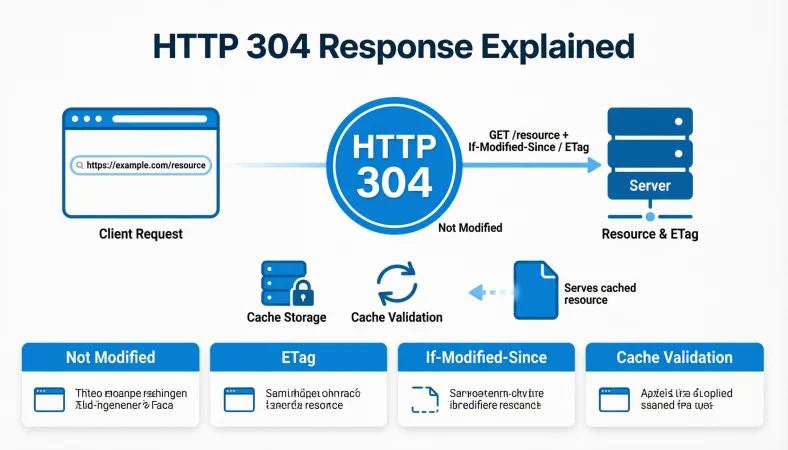
Quick Answer: An HTTP 304 response means Not Modified. It tells a browser or client that the requested resource has not changed since its last cached version, so it can reuse the stored copy instead of downloading the resource again.
Top alternatives: Not Modified, Cache Valid, Resource Unchanged, Use Cached Version, No New Content.
Ever visited a website and wondered how it loads certain pages without downloading everything again? That’s where the HTTP 304 response comes into play. Whether you’re working with APIs, debugging website performance, managing server requests, or learning HTTP status codes, understanding this response can make your technical life much easier.
The HTTP 304 response means that a requested resource has not changed since the client’s previous request. Instead of sending the entire file again, the server tells the browser to use its cached version. Pretty efficient, right? It’s like asking whether your favorite app has an update and getting a quick “Nope, you’re already up to date!” message. In this guide, you’ll discover practical HTTP 304 response examples, common headers, debugging messages, and professional explanations.
1. Simple HTTP 304 Response Examples
These examples explain the basic meaning of an HTTP 304 response in everyday technical language.
1. 304 Not Modified
Example: Use this status when a browser requests a file that has not changed.
Meaning: The requested resource is unchanged, so the cached version can be reused.
2. Resource Unchanged
Example: Display this explanation in a server log after successful cache validation.
Meaning: The server confirms that the resource remains the same.
3. Cached Version Still Valid
Example: Use this message when explaining why a browser did not download a fresh file.
Meaning: The previously stored resource is still suitable for use.
4. No New Content Available
Example: Include this description in an application monitoring dashboard.
Meaning: There is no updated content to send to the client.
5. Existing Resource Confirmed
Example: Use this message in documentation about conditional GET requests.
Meaning: The server has confirmed that the existing resource remains current.
6. Cache Validation Successful
Example: Add this message to a website performance report.
Meaning: The client’s cached resource has passed server validation.
7. No Resource Update Required
Example: Use this explanation when documenting an unchanged stylesheet request.
Meaning: The client does not need another copy of the resource.
8. Previously Downloaded Content Valid
Example: Display this message when a browser revalidates an existing image.
Meaning: The previously downloaded content is still valid.
9. Current Resource Confirmed
Example: Include this status description in an API response guide.
Meaning: The server has confirmed that the client’s cached resource is current.
2. Professional HTTP 304 Response Examples
These professional descriptions are useful for technical documentation, development reports, and server monitoring.
1. Conditional Request Successfully Validated
Example: Include this statement in a report describing successful browser cache validation.
Meaning: The server evaluated the conditional request and confirmed the resource was unchanged.
2. Requested Resource Remains Unmodified
Example: Use this explanation in an API integration document.
Meaning: The resource has not changed since the client’s previous validation.
3. Previously Cached Representation Remains Valid
Example: Add this description to enterprise application documentation.
Meaning: The client can reuse its previously stored representation.
4. Resource Validation Completed Successfully
Example: Use this statement in a website performance assessment.
Meaning: The server completed its resource validation without requiring a new representation.
5. No Updated Representation Available
Example: Include this message in an internal technical status report.
Meaning: The requested resource has no newer version to deliver.
6. Existing Cache Entry Confirmed
Example: Use this description when documenting CDN cache validation.
Meaning: The stored cache entry has been confirmed as current.
7. Conditional Retrieval Completed
Example: Include this statement in HTTP request monitoring documentation.
Meaning: The conditional retrieval process confirmed that the resource was unchanged.
8. Resource Modification Check Passed
Example: Use this explanation in a server-side caching report.
Meaning: The resource did not meet the condition for sending an updated representation.
9. No Additional Resource Transfer Required
Example: Add this description to a network optimization report.
Meaning: The server does not need to retransmit the resource body.
3. Technical HTTP 304 Response Examples
These examples are designed for developers who need accurate HTTP status descriptions.
1. HTTP/1.1 304 Not Modified
Example: Use this status line when documenting an HTTP/1.1 conditional GET response.
Meaning: The requested resource does not need to be retransmitted.
2. ETag Validation Successful
Example: Use this description when an incoming If-None-Match value matches the current ETag.
Meaning: The entity tag confirms that the cached representation is unchanged.
3. If-Modified-Since Condition Matched
Example: Include this explanation when a client’s modification date confirms that no newer resource exists.
Meaning: The server found no modification after the supplied date.
4. Conditional GET Returned 304
Example: Use this statement in a network debugging report.
Meaning: A conditional GET request resulted in a not-modified response.
5. Conditional HEAD Returned 304
Example: Include this description when documenting a HEAD request with cache validators.
Meaning: The server confirms that the resource has not changed.
6. ETag-Based Cache Validation Completed
Example: Use this message in a system that monitors entity tag comparisons.
Meaning: The entity tag was used to validate the cached resource.
7. Last-Modified Validator Confirmed
Example: Include this description when explaining date-based cache validation.
Meaning: The resource modification date indicates that the cached version remains valid.
8. If-None-Match Validator Confirmed
Example: Use this statement in API documentation explaining conditional requests.
Meaning: The matching entity tag allows the client to reuse its cached representation.
9. Resource Representation Unchanged
Example: Add this description to a technical HTTP response reference.
Meaning: The server has no updated representation to transmit.
4. Funny HTTP 304 Response Examples
Even technical status codes deserve a little personality. These descriptions make HTTP 304 easier to explain in presentations, developer chats, and informal documentation.
1. Nothing New Here!
Example: Use this caption in a developer presentation about browser caching.
Meaning: The resource has not changed, so there is nothing new to download.
2. Already Got That File!
Example: Use this friendly description when explaining a successful cache check.
Meaning: The client already has the current resource stored.
3. Same Old, Same Old!
Example: Add this humorous phrase to an internal development dashboard.
Meaning: The server found no changes to the requested resource.
4. No Update Needed Today!
Example: Use this message when discussing unchanged website assets.
Meaning: The existing cached version can still be used.
5. Your Cache Is Still Winning!
Example: Include this phrase in a lighthearted caching presentation.
Meaning: The client’s stored resource passed validation.
6. Downloading Nothing, Saving Something!
Example: Use this caption in a website optimization article.
Meaning: Reusing cached content avoids retransmitting the resource body.
7. File Still Looking Fresh!
Example: Add this phrase to an informal server monitoring report.
Meaning: The requested resource remains unchanged.
8. No Plot Twist in This Request!
Example: Use this caption in a developer social media post.
Meaning: The server found no new version of the resource.
9. Your Browser Already Knows!
Example: Use this description when teaching beginners about browser caching.
Meaning: The browser can reuse its previously stored resource.
5. Short HTTP 304 Response Examples
These short descriptions are useful for status labels, logs, monitoring tools, and technical explanations.
1. Not Modified
Example: Display this label in a browser network monitoring report.
Meaning: The requested resource remains unchanged.
2. Cache Valid
Example: Use this short message in a caching dashboard.
Meaning: The existing cached representation is valid.
3. No Changes Found
Example: Add this description to a server activity log.
Meaning: The server detected no relevant resource changes.
4. Resource Unchanged
Example: Use this label in a request tracking application.
Meaning: The requested resource remains the same.
5. Reuse Cached Content
Example: Include this message in a browser caching guide.
Meaning: The client can use its stored representation.
6. Validation Passed
Example: Display this status in a cache monitoring interface.
Meaning: The resource passed the conditional validation check.
7. No New Version
Example: Use this label in a file delivery dashboard.
Meaning: No newer resource version needs to be transferred.
8. Cache Confirmed
Example: Add this description to a server monitoring report.
Meaning: The existing cache has been confirmed as valid.
9. Update Not Required
Example: Use this message in a technical status panel.
Meaning: The client does not need another resource download.
6. HTTP 304 Response Examples for Developers
Developers frequently encounter HTTP 304 responses while testing websites, APIs, and static resources.
1. Static Asset Unchanged
Example: Use this message when a CSS file returns 304 after cache validation.
Meaning: The stylesheet has not changed since the client’s previous validation.
2. JavaScript File Validated
Example: Include this explanation when a browser revalidates an existing JavaScript file.
Meaning: The stored JavaScript resource remains current.
3. Image Resource Unchanged
Example: Use this description when an image request receives a 304 response.
Meaning: The client can reuse its cached image.
4. HTML Document Revalidated
Example: Include this message when documenting conditional requests for a webpage.
Meaning: The cached document remains valid according to the server.
5. API Resource Not Modified
Example: Use this statement when a GET request retrieves an unchanged API resource.
Meaning: The API client can reuse its cached representation.
6. Font File Cache Valid
Example: Add this explanation to a website asset optimization report.
Meaning: The cached font file does not require retransmission.
7. JSON Resource Unchanged
Example: Use this description when a client revalidates a JSON resource.
Meaning: The server confirms that the stored JSON representation remains current.
8. CDN Resource Revalidated
Example: Include this message in a content delivery network monitoring report.
Meaning: The requested resource passed the applicable cache validation.
9. Browser Cache Hit After Validation
Example: Use this explanation when discussing a browser’s local cached resource.
Meaning: The browser can use its stored copy after receiving the validation response.
7. HTTP 304 Response Examples for API Documentation
These examples help explain the status code in API references, integration guides, and developer documentation.
1. API Cache Validation Successful
Example: Use this statement in an API reference describing conditional GET requests.
Meaning: The requested API resource remains unchanged.
2. Existing API Representation Valid
Example: Include this explanation in a REST API caching guide.
Meaning: The client can reuse its previously cached representation.
3. Conditional API Request Confirmed
Example: Use this message in API request monitoring documentation.
Meaning: The server successfully evaluated the conditional request.
4. No Updated API Data
Example: Add this description to an API response troubleshooting guide.
Meaning: The server has no updated representation to send.
5. ETag Matches Current Representation
Example: Use this statement when documenting ETag-based API validation.
Meaning: The supplied entity tag matches the current representation.
6. API Resource Revalidated
Example: Include this description in an integration testing report.
Meaning: The API resource has passed cache validation.
7. Conditional Retrieval Successful
Example: Use this message in API performance documentation.
Meaning: The client successfully checked whether an updated resource was available.
8. API Cache Remains Current
Example: Add this explanation to a caching implementation guide.
Meaning: The stored API representation remains valid.
9. Existing Response Can Be Reused
Example: Use this description in an API client development guide.
Meaning: The client can reuse the previously stored response representation.
8. Sarcastic HTTP 304 Response Examples
Want to explain caching without making a technical discussion feel like a textbook? These playful descriptions add personality.
1. Still the Same File, Obviously!
Example: Use this caption in a casual developer presentation.
Meaning: The requested resource has not changed.
2. Did You Expect a Surprise Update?
Example: Add this phrase to a humorous cache validation explanation.
Meaning: The server has no new version to deliver.
3. Nothing Changed, Move Along!
Example: Use this message in an informal debugging report.
Meaning: The cached resource remains valid.
4. Your Download Request Was Unnecessary!
Example: Include this phrase in a caching optimization discussion.
Meaning: The client already has a reusable copy.
5. Same Content, Different Request!
Example: Use this caption when explaining repeated resource requests.
Meaning: The resource remains unchanged despite another request.
6. The File Has Not Had a Makeover!
Example: Add this line to a presentation about static website assets.
Meaning: The resource has not been modified.
7. No Update Drama Today!
Example: Use this phrase in a casual server monitoring dashboard.
Meaning: No new resource version is available.
8. The Cache Already Did Its Homework!
Example: Include this caption in an introductory HTTP lesson.
Meaning: The client’s stored resource has passed validation.
9. Still Using Yesterday’s Content!
Example: Use this explanation when discussing an unchanged cached resource.
Meaning: The stored representation remains current according to the server.
9. HTTP 304 Response Examples for Browser Caching
Browser caching is one of the most familiar situations where an HTTP 304 response appears.
1. Browser Cache Successfully Revalidated
Example: Use this explanation when inspecting an unchanged webpage resource in browser developer tools.
Meaning: The server confirmed that the cached resource remains valid.
2. Existing Browser Copy Reused
Example: Include this message in a guide explaining browser cache behavior.
Meaning: The browser can reuse its stored resource.
3. Cached Website Image Confirmed
Example: Use this statement when an image receives a 304 response.
Meaning: The previously cached image has not changed.
4. Browser Resource Validation Complete
Example: Add this description to a browser network activity report.
Meaning: The conditional resource check has finished successfully.
5. Cached Stylesheet Still Valid
Example: Use this explanation when a browser revalidates a CSS stylesheet.
Meaning: The browser can reuse the existing stylesheet.
6. Website Script Remains Unchanged
Example: Include this description when examining JavaScript requests.
Meaning: The stored script remains valid according to the server.
7. Local Resource Reuse Confirmed
Example: Use this message in a browser caching tutorial.
Meaning: The client can reuse the resource stored locally.
8. Cached Page Representation Valid
Example: Add this explanation to a website troubleshooting document.
Meaning: The stored webpage representation has passed validation.
9. Browser Avoided Full Resource Transfer
Example: Use this statement in a website performance report.
Meaning: The server did not need to resend the resource body.
10. HTTP 304 Response Examples for Server Logs
Server logs help developers understand how frequently clients validate cached resources.
1. GET Request Returned 304
Example: Use this log description when a conditional GET request receives a not-modified response.
Meaning: The server confirmed that the requested resource was unchanged.
2. Static File Returned 304
Example: Include this entry when monitoring repeated requests for static files.
Meaning: The requested static file did not require retransmission.
3. ETag Comparison Successful
Example: Add this message to logs that track entity tag validation.
Meaning: The entity tag comparison confirmed that the cached resource was current.
4. Cache Revalidation Returned 304
Example: Use this entry in a server access log analysis.
Meaning: The conditional request resulted in a not-modified status.
5. Resource Modification Check Completed
Example: Include this message in a backend monitoring system.
Meaning: The server checked the resource for relevant changes.
6. Conditional Request Served Successfully
Example: Use this description in application server reporting.
Meaning: The server successfully processed the conditional request.
7. Existing Representation Retained
Example: Add this message to cache validation logs.
Meaning: The client can retain and reuse its stored representation.
8. Resource Body Not Transmitted
Example: Use this entry when analyzing response transfer sizes.
Meaning: The 304 response did not include a resource body.
9. Last-Modified Check Completed
Example: Include this description when monitoring date-based resource validation.
Meaning: The server evaluated the modification date supplied by the client.
11. HTTP 304 Response Examples for Website Performance
A properly configured cache can reduce repeated resource transfers and improve the efficiency of website delivery.
1. Unchanged Asset Reused
Example: Use this explanation in a website optimization report.
Meaning: An unchanged asset can be reused from the client’s cache.
2. Reduced Resource Transfer
Example: Include this message in a network efficiency assessment.
Meaning: The server avoids retransmitting the unchanged resource body.
3. Cache Validation Reduces Bandwidth
Example: Use this statement in a technical performance presentation.
Meaning: Conditional requests can reduce the amount of resource data transferred.
4. Website Asset Revalidation Successful
Example: Add this description to a website speed audit.
Meaning: The server confirmed that the cached asset remains valid.
5. Fewer Resource Bytes Transmitted
Example: Include this explanation in a network optimization report.
Meaning: A 304 response avoids sending the full resource body again.
6. Browser Cache Efficiency Confirmed
Example: Use this statement when discussing browser caching performance.
Meaning: The browser can reuse a previously stored resource after validation.
7. Static Resource Transfer Avoided
Example: Add this description to a website infrastructure report.
Meaning: The unchanged static resource does not need to be retransmitted.
8. Conditional Caching Working Correctly
Example: Use this explanation when evaluating website cache configuration.
Meaning: The server and client are successfully using conditional requests.
9. Repeated Download Avoided
Example: Include this statement in a frontend optimization presentation.
Meaning: The client can reuse the existing resource instead of downloading another copy.
12. HTTP 304 Response Examples for API Monitoring
API monitoring systems can use these descriptions to make cache validation activity easier to understand.
1. API Conditional Request Successful
Example: Display this status when monitoring a conditional API GET request.
Meaning: The API server confirmed that the resource was unchanged.
2. API Resource Cache Valid
Example: Use this label in an API performance dashboard.
Meaning: The cached API representation remains valid.
3. No New API Representation
Example: Include this message in an API request activity log.
Meaning: The server has no updated representation to transmit.
4. API ETag Validation Passed
Example: Use this description when monitoring ETag-based API requests.
Meaning: The entity tag confirms that the representation remains unchanged.
5. API Cache Revalidation Complete
Example: Display this status in an API monitoring interface.
Meaning: The API resource has completed its conditional validation.
6. Cached API Response Reusable
Example: Use this message in API client documentation.
Meaning: The client can reuse its existing cached representation.
7. API Request Returned Not Modified
Example: Include this description in a request analytics report.
Meaning: The server returned HTTP status 304 for an unchanged resource.
8. Resource Validator Matched
Example: Use this message when monitoring matching entity tags.
Meaning: The validator confirms that the cached representation is current.
9. API Data Version Unchanged
Example: Add this statement to an API troubleshooting report.
Meaning: The requested resource has not changed since its previous validation.
13. HTTP 304 Response Examples for Technical Documentation
Use these explanations in manuals, training material, HTTP references, and software documentation.
1. The Resource Has Not Changed
Example: Use this definition in an HTTP status code reference.
Meaning: HTTP 304 indicates that the requested resource remains unchanged.
2. The Cached Representation Can Be Reused
Example: Include this explanation in a browser caching manual.
Meaning: The client can reuse the stored representation after validation.
3. No Response Body Is Included
Example: Add this technical note to an HTTP response guide.
Meaning: A 304 response does not contain a message body.
4. Conditional GET Validation
Example: Use this description in a conditional request tutorial.
Meaning: The server evaluates the client’s conditions before deciding whether to send the resource.
5. ETag-Based Validation
Example: Include this definition in a guide about HTTP entity tags.
Meaning: The server uses an entity tag to determine whether the representation has changed.
6. Date-Based Validation
Example: Use this description when explaining the If-Modified-Since header.
Meaning: The server checks whether the resource changed after the supplied date.
7. Cache Metadata Preserved
Example: Add this explanation to an HTTP caching reference.
Meaning: Relevant cache metadata helps the client manage its stored representation.
8. Not a Client Error
Example: Use this note in an HTTP status code training guide.
Meaning: A 304 response is a cache validation result, not a typical client error.
9. Not a Server Error
Example: Include this explanation in an HTTP troubleshooting manual.
Meaning: HTTP 304 does not indicate that the server failed to process the request.
14. Clever HTTP 304 Response Examples
These explanations turn a technical status into something memorable without losing its meaning.
1. The Server Checked, the Cache Won
Example: Use this phrase in a caching tutorial for beginners.
Meaning: The server validated the stored resource without requiring a new copy.
2. A Request Without a Redownload
Example: Include this caption in a website performance presentation.
Meaning: The client can reuse its existing resource after validation.
3. Same Resource, Smarter Delivery
Example: Use this statement in a web optimization article.
Meaning: Conditional caching avoids unnecessary resource retransmission.
4. Validation Over Repetition
Example: Add this phrase to a technical presentation about HTTP caching.
Meaning: The server checks the existing resource rather than sending it again.
5. The Cache Has the Latest Version
Example: Use this explanation when describing a successful ETag comparison.
Meaning: The cached representation matches the current server resource.
6. Less Downloading, More Efficiency
Example: Include this caption in a network optimization discussion.
Meaning: A 304 response helps avoid transferring unchanged resource data.
7. No Change Means No New Copy
Example: Use this statement in an introductory HTTP guide.
Meaning: An unchanged resource does not require another full transfer.
8. The Resource Passed Its Checkup
Example: Add this phrase to a developer presentation about cache validation.
Meaning: The server confirmed that the cached resource remains valid.
9. Conditional Request, Clear Result
Example: Use this caption in API documentation.
Meaning: The server evaluated the condition and returned the appropriate response.
15. HTTP 304 Response Examples for Troubleshooting
These examples help developers explain and investigate 304 responses during website and application debugging.
1. Unexpected 304 Response Observed
Example: Use this message when a developer notices a 304 in the browser network panel.
Meaning: Investigate the conditional request headers and cache behavior.
2. Check the If-None-Match Header
Example: Include this troubleshooting note when investigating ETag-based validation.
Meaning: Verify whether the request contains the expected entity tag.
3. Review the If-Modified-Since Header
Example: Use this instruction when investigating date-based cache validation.
Meaning: Check the modification date supplied with the conditional request.
4. Verify the ETag Value
Example: Add this message to a debugging checklist for an unexpected cache result.
Meaning: Compare the client’s validator with the server’s current ETag.
5. Inspect Cache-Control Directives
Example: Use this note when troubleshooting browser cache behavior.
Meaning: Review the cache directives to understand the resource’s caching policy.
6. Check the Last-Modified Header
Example: Include this instruction when investigating date-based resource validation.
Meaning: Confirm that the server provides an appropriate modification timestamp.
7. Inspect the Browser’s Cached Resource
Example: Use this instruction when a page displays unexpected cached content.
Meaning: Check whether the browser is reusing an older stored representation.
8. Review the Server Response Headers
Example: Add this step to an HTTP debugging checklist.
Meaning: Confirm that the 304 response includes the relevant metadata.
9. Verify Conditional Request Behavior
Example: Use this message when testing a website’s caching implementation.
Meaning: Check that conditional requests produce the expected status codes.
FAQs
What Does the HTTP 304 Response Mean?
HTTP 304 means Not Modified. The server confirms that the cached resource remains valid.
What Is the Emotional or Flirty Interpretation of HTTP 304?
HTTP 304 has no emotional or flirty meaning. It is a technical HTTP status code.
How Is HTTP 304 Used Professionally?
Developers use HTTP 304 to describe successful cache validation and avoid unnecessary resource transfers.
What Should You Say If You Don’t Actually Mean It?
Explain that the resource needs a fresh download if its cached version is outdated.
Is Humor Appropriate When Explaining HTTP 304?
Yes! Humor works in informal tutorials, presentations, and developer conversations, but use precise terminology in documentation.
Conclusion
Understanding the HTTP 304 response makes website development, API monitoring, and browser caching much easier. It is not an error or a sign that something has gone wrong. Instead, it tells the client that the requested resource has not changed and its cached version can be reused.
From ETag validation to conditional GET requests, this status code plays an important role in efficient web communication. Whether you’re a beginner, developer, or website administrator, knowing how to recognize and explain HTTP 304 can save troubleshooting time. Save these examples, share them with fellow developers, and keep making your HTTP knowledge stronger.