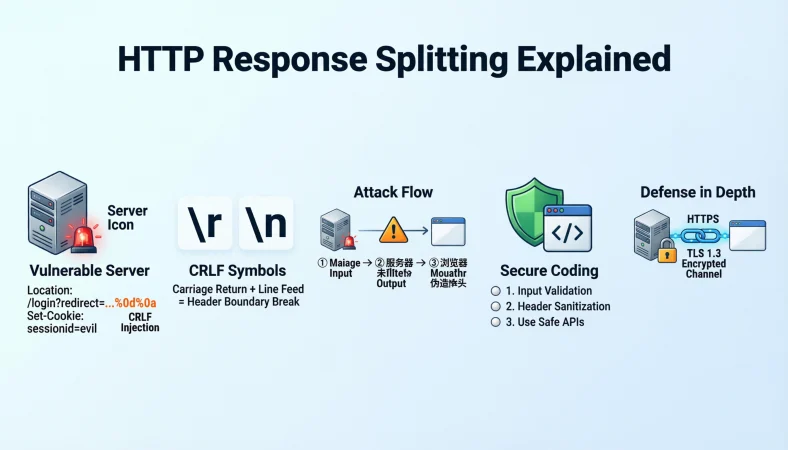
Quick Answer: HTTP response splitting is a web security issue where attacker-controlled input can influence HTTP response headers or add unintended response content. Clear responses should focus on input validation, safe header handling, and preventing CRLF characters from reaching HTTP responses.
Top alternatives: CRLF injection, HTTP header injection, response header manipulation, newline injection, web response security
HTTP response splitting sounds like one of those technical phrases that makes your browser want to take a coffee break. But if you work with web applications, APIs, cybersecurity, software development, or security testing, understanding the phrase can save you from some seriously confusing conversations.
You may see it in a security report, a penetration testing finding, a code review, or a developer DM asking, “Is this actually a vulnerability?” A good HTTP response splitting response should explain the issue without drowning everyone in jargon. The basic concern is that untrusted input reaches an HTTP response in a way that can alter its structure, often involving carriage return and line feed characters.
The best replies are short, accurate, and practical. Below are ready-to-use responses for developers, security teams, students, technical writers, and anyone who wants to explain the topic without making it sound like a networking textbook.
Simple Responses About HTTP Response Splitting
1. “HTTP response splitting happens when untrusted input can influence the structure of an HTTP response.”
Example: Use this when explaining the vulnerability to someone new to web security.
Meaning: It gives a simple definition without unnecessary technical detail.
2. “It’s basically a response header injection problem.”
Example: Use this as a quick explanation during a casual technical discussion.
Meaning: It connects response splitting with the broader idea of header injection.
3. “The main concern is attacker-controlled data reaching the response in an unsafe format.”
Example: Use this when discussing a suspicious web application input.
Meaning: It highlights the role of unsafe data handling.
4. “CRLF characters are a key part of many HTTP response splitting issues.”
Example: Use this when someone asks what makes the attack possible.
Meaning: It identifies the characters commonly associated with the vulnerability.
5. “It can let unexpected headers or response content get inserted into an HTTP response.”
Example: Use this when describing potential impact.
Meaning: It explains why improper response construction matters.
6. “Think of it as letting input tamper with the boundaries of an HTTP response.”
Example: Use this when explaining the concept with an easy analogy.
Meaning: It makes the technical idea easier to visualize.
7. “The fix usually starts with strict input validation and safe response construction.”
Example: Use this when someone asks how developers should approach the issue.
Meaning: It points toward defensive coding practices.
8. “Never assume user input is safe just because it looks harmless in the browser.”
Example: Use this during a secure coding discussion.
Meaning: It reinforces the importance of server-side validation.
9. “HTTP response splitting is mainly about controlling how untrusted data reaches an HTTP response.”
Example: Use this for a concise security explanation.
Meaning: It focuses attention on the data flow.
10. “It’s a server-side security problem, not just a weird browser behavior.”
Example: Use this when someone dismisses the issue as browser formatting.
Meaning: It clarifies where the vulnerability generally originates.
11. “The exact risk depends on how the vulnerable application constructs its responses.”
Example: Use this when discussing severity.
Meaning: It avoids treating every finding as identical.
12. “The safest mindset is simple: keep untrusted input out of security-sensitive response headers.”
Example: Use this as a practical takeaway.
Meaning: It summarizes a strong defensive principle.
Funny Responses About HTTP Response Splitting
1. “When your HTTP response decides it needs a plot twist.”
Example: Use this for a lighthearted cybersecurity post.
Meaning: It jokes about an unexpected response structure.
2. “The server said one response, but the input had other plans.”
Example: Use this as a meme-style technical caption.
Meaning: It humorously describes unexpected input influence.
3. “HTTP response splitting: because apparently one response was not enough.”
Example: Use this for a playful security awareness post.
Meaning: It turns the technical name into an easy joke.
4. “CRLF walked into the response and brought unwanted guests.”
Example: Use this when explaining the basic concept humorously.
Meaning: It personifies unexpected response content.
5. “Your header formatting just entered its villain era.”
Example: Use this for a developer meme.
Meaning: It playfully describes unsafe header handling.
6. “The response got split faster than a group project chat.”
Example: Use this for a casual cybersecurity meme.
Meaning: It compares unexpected splitting with a familiar situation.
7. “One HTTP response, two unexpected vibes.”
Example: Use this as a short social caption.
Meaning: It humorously signals an altered response.
8. “Input validation left the chat.”
Example: Use this when joking about missing validation.
Meaning: It points to weak input handling.
9. “The server wanted clean headers. The input chose chaos.”
Example: Use this for a cybersecurity post.
Meaning: It contrasts intended behavior with unsafe input.
10. “Nothing says Friday deployment like an unexpected response header.”
Example: Use this as workplace tech humor.
Meaning: It jokes about security problems appearing at inconvenient times.
11. “HTTP said hello. CRLF said let me rearrange things.”
Example: Use this for a beginner-friendly meme.
Meaning: It humorously represents response manipulation.
12. “Security testing found a little surprise hiding in the response.”
Example: Use this when discussing a newly discovered finding.
Meaning: It keeps the tone light while acknowledging the security concern.
Professional Responses About HTTP Response Splitting
1. “The finding indicates that untrusted input may influence HTTP response structure.”
Example: Use this in a professional security report.
Meaning: It communicates the concern without exaggeration.
2. “The application should prevent untrusted values from directly controlling response headers.”
Example: Use this during a code review.
Meaning: It provides a clear defensive recommendation.
3. “Please review all user-controlled values used in response header construction.”
Example: Use this in a developer ticket.
Meaning: It identifies an appropriate area for investigation.
4. “The issue should be evaluated based on the affected endpoint and response behavior.”
Example: Use this in a vulnerability assessment.
Meaning: It emphasizes context-specific analysis.
5. “Input validation should occur before untrusted values are incorporated into responses.”
Example: Use this in secure coding guidance.
Meaning: It recommends validation before sensitive processing.
6. “The response construction logic should reject invalid control characters.”
Example: Use this during remediation planning.
Meaning: It highlights a relevant defensive measure.
7. “Please verify whether the framework already provides safe header handling.”
Example: Use this during application remediation.
Meaning: It encourages use of established framework protections.
8. “The vulnerability should be reproduced safely in a controlled testing environment.”
Example: Use this during security assessment planning.
Meaning: It encourages responsible verification.
9. “The security impact depends on whether attacker-controlled input can alter response boundaries.”
Example: Use this in a technical report.
Meaning: It connects exploitability with actual response behavior.
10. “The affected code path should be reviewed for unsafe response header construction.”
Example: Use this in a development ticket.
Meaning: It points developers toward the relevant code.
11. “Remediation should address the underlying input-handling flaw rather than only the visible symptom.”
Example: Use this after identifying a vulnerable endpoint.
Meaning: It encourages a root-cause fix.
12. “After remediation, regression testing should confirm that response structure remains controlled.”
Example: Use this in a security verification plan.
Meaning: It recommends testing the fix rather than assuming it worked.
Clever Responses About HTTP Response Splitting
1. “The interesting part is not the input itself, but what the server does with it.”
Example: Use this when explaining vulnerability analysis.
Meaning: It shifts attention toward server-side data handling.
2. “Follow the data, and you usually find the security story.”
Example: Use this during a code review discussion.
Meaning: It encourages tracing untrusted input through the application.
3. “A harmless-looking parameter can become risky when placed inside a response header.”
Example: Use this for security education.
Meaning: It explains why context matters.
4. “Response splitting is a reminder that formatting can become a security boundary.”
Example: Use this in a cybersecurity presentation.
Meaning: It connects formatting with application security.
5. “The key question is whether input can cross from data into HTTP structure.”
Example: Use this during vulnerability analysis.
Meaning: It frames the core security concern clearly.
6. “A response header is not the place to blindly trust user input.”
Example: Use this as a secure coding reminder.
Meaning: It emphasizes cautious handling of untrusted data.
7. “Validation is useful, but context-aware output handling matters too.”
Example: Use this during a developer discussion.
Meaning: It encourages a layered approach.
8. “The endpoint tells you where the issue appears; the data flow tells you why.”
Example: Use this during penetration testing analysis.
Meaning: It separates location from root cause.
9. “Don’t judge a vulnerability by its name alone; inspect the actual behavior.”
Example: Use this when reviewing a security finding.
Meaning: It encourages evidence-based assessment.
10. “The cleanest fix usually starts at the point where untrusted input enters the response.”
Example: Use this in remediation planning.
Meaning: It highlights the importance of fixing the relevant data flow.
11. “HTTP is structured, so uncontrolled characters can become more than ordinary text.”
Example: Use this for beginner security education.
Meaning: It explains why special characters can matter.
12. “Good response handling keeps application data from rewriting protocol structure.”
Example: Use this as a concise security principle.
Meaning: It summarizes the defensive goal.
Security Analyst Responses About HTTP Response Splitting
1. “I’d trace the parameter from input to the final HTTP response before judging the finding.”
Example: Use this during vulnerability triage.
Meaning: It recommends confirming the complete data flow.
2. “Let’s verify whether the supplied value can actually influence response headers.”
Example: Use this during a security review.
Meaning: It focuses testing on the relevant behavior.
3. “The presence of special characters alone does not establish the full security impact.”
Example: Use this when reviewing scanner output.
Meaning: It distinguishes indicators from confirmed impact.
4. “The endpoint’s response behavior should be inspected under controlled testing.”
Example: Use this during penetration testing.
Meaning: It recommends evidence-based verification.
5. “Check whether the framework normalizes or rejects unsafe header values.”
Example: Use this during application analysis.
Meaning: It identifies an important defensive control to review.
6. “Review every code path that copies user input into response headers.”
Example: Use this during source code analysis.
Meaning: It encourages broader root-cause investigation.
7. “The finding needs context from the application architecture.”
Example: Use this when discussing vulnerability severity.
Meaning: It acknowledges that implementation details affect risk.
8. “A scanner alert is a starting point, not the entire investigation.”
Example: Use this when explaining automated findings.
Meaning: It encourages manual validation.
9. “Confirm whether the application rejects carriage return and line feed characters appropriately.”
Example: Use this during defensive testing.
Meaning: It highlights relevant input handling.
10. “Look for unsafe redirects, cookies, or other response headers in the affected flow.”
Example: Use this during a controlled code review.
Meaning: It identifies areas that may deserve examination.
11. “Document both the vulnerable data flow and the recommended remediation.”
Example: Use this when preparing a security report.
Meaning: It makes the finding actionable for developers.
12. “Retest after remediation to confirm the original behavior is no longer possible.”
Example: Use this during vulnerability verification.
Meaning: It emphasizes confirming the fix.
Developer Responses About HTTP Response Splitting
1. “I’ll review where user input enters the response header.”
Example: Use this when responding to a security ticket.
Meaning: It shows that the relevant code path will be investigated.
2. “I’ll replace direct header construction with the framework’s safer response APIs where appropriate.”
Example: Use this during remediation planning.
Meaning: It focuses on safer response handling.
3. “I’ll add validation for values that should never contain HTTP control characters.”
Example: Use this when planning a defensive code change.
Meaning: It targets inappropriate input.
4. “I’ll trace the value from request input through the response generation code.”
Example: Use this during debugging.
Meaning: It confirms the complete data flow.
5. “I’ll check whether the framework already blocks unsafe header values.”
Example: Use this during secure coding work.
Meaning: It avoids duplicating or bypassing built-in protections.
6. “I’ll make sure response headers receive only expected, validated values.”
Example: Use this during remediation.
Meaning: It establishes a safer coding rule.
7. “I’ll add a regression test for the vulnerable response path.”
Example: Use this after fixing the issue.
Meaning: It helps prevent the same flaw from returning.
8. “I’ll review similar endpoints for the same coding pattern.”
Example: Use this during a broader security fix.
Meaning: It looks beyond one affected location.
9. “I’ll avoid treating user-controlled strings as trusted HTTP structure.”
Example: Use this as a secure development principle.
Meaning: It separates application data from protocol syntax.
10. “I’ll document the remediation so future changes don’t reintroduce the issue.”
Example: Use this after resolving a security finding.
Meaning: It supports long-term maintainability.
11. “I’ll test the response after the change instead of relying only on the code review.”
Example: Use this during verification.
Meaning: It confirms actual runtime behavior.
12. “I’ll coordinate with security before closing the finding.”
Example: Use this when a vulnerability requires verification.
Meaning: It supports collaborative security validation.
Polite Responses About HTTP Response Splitting
1. “Thanks for flagging it. I’ll review the affected response handling.”
Example: Use this when acknowledging a security report.
Meaning: It responds professionally without accepting an unverified conclusion.
2. “Good catch. Let’s verify the behavior before deciding on the remediation.”
Example: Use this during a technical review.
Meaning: It keeps the discussion evidence-based.
3. “I appreciate the report. Could you share the affected endpoint and context?”
Example: Use this when more information is needed.
Meaning: It requests useful technical details.
4. “That’s worth investigating, especially if user input reaches a response header.”
Example: Use this when discussing a potential finding.
Meaning: It acknowledges the relevant risk area.
5. “Let’s trace the input path and confirm what the server actually returns.”
Example: Use this during collaborative debugging.
Meaning: It suggests a practical verification step.
6. “I’ll check whether the framework already provides protection for this case.”
Example: Use this in a development conversation.
Meaning: It considers existing security controls.
7. “The context matters here, so I’d like to verify the implementation first.”
Example: Use this when severity is uncertain.
Meaning: It avoids jumping to conclusions.
8. “Could you include the relevant response behavior in the security report?”
Example: Use this during vulnerability triage.
Meaning: It asks for evidence that helps reproduce the issue.
9. “Let’s focus on the underlying input flow rather than only the scanner message.”
Example: Use this during security testing.
Meaning: It encourages deeper investigation.
10. “I’ll review the code and follow up with the appropriate remediation.”
Example: Use this when accepting a technical task.
Meaning: It communicates a clear next step.
11. “Thanks for pointing this out. We’ll include it in the security review.”
Example: Use this for professional acknowledgement.
Meaning: It recognizes the report respectfully.
12. “Let’s confirm the fix with a controlled retest.”
Example: Use this after remediation.
Meaning: It emphasizes verification.
Short Responses For Security Reports
1. “Potential HTTP response splitting identified in response construction.”
Example: Use this as a concise finding title.
Meaning: It describes the suspected issue without overstating it.
2. “User-controlled input appears to reach an HTTP response header.”
Example: Use this in a technical finding summary.
Meaning: It identifies the relevant data flow.
3. “Further validation is required to confirm response manipulation.”
Example: Use this when a scanner finding is unverified.
Meaning: It clearly communicates the current assessment stage.
4. “Review response header construction for unsafe input handling.”
Example: Use this as a remediation note.
Meaning: It gives developers a focused action.
5. “Validate and constrain values before placing them into response headers.”
Example: Use this in remediation guidance.
Meaning: It recommends controlled input handling.
6. “Review the affected endpoint for response boundary manipulation.”
Example: Use this during vulnerability analysis.
Meaning: It points toward the relevant behavior.
7. “Confirm whether the application rejects inappropriate HTTP control characters.”
Example: Use this during technical verification.
Meaning: It identifies an important validation question.
8. “Inspect all related response construction paths for the same pattern.”
Example: Use this after finding one vulnerable location.
Meaning: It encourages broader code review.
9. “Retest the endpoint after remediation.”
Example: Use this in a security closure checklist.
Meaning: It requires verification before closure.
10. “Document the affected input source and response sink.”
Example: Use this in a security assessment report.
Meaning: It creates a clear data-flow record.
11. “Confirm whether the issue is exploitable in the deployed configuration.”
Example: Use this during validation.
Meaning: It distinguishes theoretical exposure from actual behavior.
12. “Track remediation and verification as separate security activities.”
Example: Use this in vulnerability management.
Meaning: It prevents fixing and validating from being treated as the same step.
Sarcastic Responses About HTTP Response Splitting
1. “Because apparently the HTTP response wanted its own sequel.”
Example: Use this in a light cybersecurity meme.
Meaning: It jokes about an unexpectedly altered response.
2. “Nothing like letting input redesign your headers.”
Example: Use this when joking about unsafe response construction.
Meaning: It highlights the underlying security mistake.
3. “Who needs predictable responses when we have uncontrolled input?”
Example: Use this as developer humor.
Meaning: It sarcastically criticizes unsafe input handling.
4. “Perfect response? Nah, let’s let the parameter decorate it.”
Example: Use this for a technical meme.
Meaning: It jokes about user input affecting response structure.
5. “The header was fine until somebody trusted the input.”
Example: Use this as a short security caption.
Meaning: It points toward improper trust of user-controlled data.
6. “Everything was normal until CRLF joined the meeting.”
Example: Use this for a cybersecurity post.
Meaning: It humorously references control characters.
7. “Secure headers are apparently optional today.”
Example: Use this when discussing a hypothetical coding mistake.
Meaning: It sarcastically emphasizes the importance of safe handling.
8. “One response was apparently too mainstream.”
Example: Use this as a social media caption.
Meaning: It jokes about response splitting.
9. “Nothing suspicious here, just user input shaping the response.”
Example: Use this when highlighting a security concern.
Meaning: It sarcastically calls attention to unsafe behavior.
10. “The application said trusted input. Security said, absolutely not.”
Example: Use this for developer humor.
Meaning: It contrasts assumptions with secure coding principles.
11. “Headers deserve boundaries too.”
Example: Use this as a short cybersecurity caption.
Meaning: It emphasizes response structure protection.
12. “That response has more plot twists than a season finale.”
Example: Use this for a playful security post.
Meaning: It humorously describes unexpected response behavior.
Creative Responses About HTTP Response Splitting
1. “Think of the HTTP response as a carefully packed box; unsafe input can mess with the packaging.”
Example: Use this when teaching beginners.
Meaning: It uses an everyday analogy to explain response structure.
2. “Your application should treat user input as data, not as instructions for building protocol structure.”
Example: Use this in secure coding education.
Meaning: It clearly separates data from protocol syntax.
3. “A clean response starts with controlled data entering controlled fields.”
Example: Use this as a security presentation line.
Meaning: It connects safe input handling with predictable output.
4. “If input can rewrite the response, your boundary just became a security concern.”
Example: Use this in a cybersecurity article.
Meaning: It explains why response boundaries matter.
5. “HTTP has rules, and user input should not get to rewrite them.”
Example: Use this for beginner awareness.
Meaning: It summarizes the security principle simply.
6. “Treat response headers like restricted areas, not open comment boxes.”
Example: Use this during developer training.
Meaning: It encourages controlled header construction.
7. “The goal is simple: data stays data, and protocol structure stays controlled.”
Example: Use this as a memorable security takeaway.
Meaning: It captures the core defensive concept.
8. “Good validation keeps unexpected characters from becoming unexpected behavior.”
Example: Use this in secure coding content.
Meaning: It explains why validation matters.
9. “A tiny character can matter when it changes the meaning of a protocol message.”
Example: Use this for cybersecurity education.
Meaning: It shows why control characters deserve attention.
10. “Security often lives in the boring details, including how strings enter headers.”
Example: Use this in a developer presentation.
Meaning: It emphasizes careful implementation.
11. “The response should reflect application data, not rewrite its own structure.”
Example: Use this as a security principle.
Meaning: It describes the desired behavior.
12. “Clean input plus controlled output equals fewer unexpected HTTP surprises.”
Example: Use this as a memorable closing line.
Meaning: It summarizes a defensive approach.
Casual Responses About HTTP Response Splitting
1. “It’s basically an HTTP response formatting problem with security consequences.”
Example: Use this when explaining it casually to a developer friend.
Meaning: It provides a quick high-level description.
2. “It happens when input gets too much influence over the HTTP response.”
Example: Use this in a quick chat.
Meaning: It explains the issue without deep jargon.
3. “CRLF is one of the big terms to know here.”
Example: Use this when introducing the topic.
Meaning: It identifies an important concept.
4. “The short version: don’t let random input build your headers.”
Example: Use this as a casual security reminder.
Meaning: It summarizes safer coding behavior.
5. “It’s one of those bugs that looks small until you inspect the response.”
Example: Use this during security discussions.
Meaning: It encourages examining actual behavior.
6. “Check the input flow before panicking.”
Example: Use this when someone discovers a scanner alert.
Meaning: It encourages calm technical verification.
7. “If the input reaches a response header, pay attention.”
Example: Use this as a quick security reminder.
Meaning: It identifies a relevant warning sign.
8. “The framework might already block it, so check that first.”
Example: Use this during a code review.
Meaning: It encourages checking existing protections.
9. “The exact risk depends on what the endpoint actually does.”
Example: Use this when discussing vulnerability severity.
Meaning: It emphasizes implementation context.
10. “It’s not just about weird characters; it’s about where they end up.”
Example: Use this for beginner education.
Meaning: It explains why context matters.
11. “Trace the value, inspect the response, then decide what needs fixing.”
Example: Use this during troubleshooting.
Meaning: It provides a simple investigation sequence.
12. “Keep user input away from raw response structure.”
Example: Use this as a quick secure coding rule.
Meaning: It gives a concise defensive principle.
Confident Responses About HTTP Response Splitting
1. “I’ll verify the data flow before calling this a confirmed vulnerability.”
Example: Use this when responding to an unverified security alert.
Meaning: It demonstrates careful technical judgment.
2. “The right fix starts with understanding how the response is constructed.”
Example: Use this during remediation planning.
Meaning: It prioritizes root-cause analysis.
3. “We should test the actual response behavior rather than assume the impact.”
Example: Use this during security validation.
Meaning: It promotes evidence-based assessment.
4. “The affected input should be treated as untrusted throughout the request lifecycle.”
Example: Use this during secure coding discussions.
Meaning: It reinforces consistent input trust boundaries.
5. “Response headers need controlled values, especially when input originates from users.”
Example: Use this in a code review.
Meaning: It states a clear defensive principle.
6. “I’ll review related endpoints for the same response construction pattern.”
Example: Use this after identifying a suspicious code path.
Meaning: It looks for related instances.
7. “A clean security fix should remove the unsafe data flow, not hide the alert.”
Example: Use this during remediation discussions.
Meaning: It emphasizes addressing the underlying issue.
8. “I’ll confirm the framework behavior before adding unnecessary custom controls.”
Example: Use this during development.
Meaning: It encourages practical use of existing protections.
9. “The finding needs evidence from the actual application behavior.”
Example: Use this during vulnerability triage.
Meaning: It separates a report from confirmed behavior.
10. “Once fixed, we’ll retest the same path and related cases.”
Example: Use this in a security verification plan.
Meaning: It supports thorough remediation testing.
11. “The goal is predictable response construction every time.”
Example: Use this as a development principle.
Meaning: It describes the desired security outcome.
12. “We can handle this systematically: trace, validate, remediate, and retest.”
Example: Use this when organizing a security task.
Meaning: It provides a clear and confident workflow.
Educational Responses About HTTP Response Splitting
1. “HTTP response splitting is commonly associated with CRLF injection into HTTP responses.”
Example: Use this in an introductory cybersecurity lesson.
Meaning: It gives students the central technical relationship.
2. “CRLF refers to carriage return and line feed characters used in HTTP formatting.”
Example: Use this when defining the terminology.
Meaning: It explains the abbreviation in plain language.
3. “The security concern begins when untrusted input can influence response structure.”
Example: Use this in classroom notes.
Meaning: It identifies the fundamental issue.
4. “Response splitting is related to improper handling of data used in HTTP headers.”
Example: Use this in a web security study guide.
Meaning: It connects the vulnerability to header handling.
5. “Input validation can help prevent inappropriate control characters from reaching sensitive output.”
Example: Use this in secure coding education.
Meaning: It explains one defensive approach.
6. “Developers should use framework APIs designed for safe response construction.”
Example: Use this in application security training.
Meaning: It encourages safer implementation patterns.
7. “Security testing should confirm actual response behavior rather than rely only on a scanner result.”
Example: Use this in a penetration testing lesson.
Meaning: It teaches validation of findings.
8. “The same security principle applies broadly: untrusted data should not control protocol structure.”
Example: Use this in cybersecurity fundamentals.
Meaning: It connects the concept to wider secure coding practices.
9. “The vulnerability can appear in different application architectures, so implementation details matter.”
Example: Use this during technical instruction.
Meaning: It explains why context is important.
10. “A response header should contain properly controlled values rather than arbitrary user input.”
Example: Use this as a study note.
Meaning: It presents a practical security rule.
11. “Testing should occur in an authorized environment with appropriate safeguards.”
Example: Use this in security training.
Meaning: It promotes responsible testing practices.
12. “The best remediation combines safe APIs, appropriate validation, and regression testing.”
Example: Use this as a course summary.
Meaning: It summarizes a layered defensive approach.
Practical Responses For HTTP Response Splitting Remediation
1. “Start by locating every place untrusted input enters response headers.”
Example: Use this when creating a remediation checklist.
Meaning: It establishes the first investigation step.
2. “Use safe framework mechanisms for setting response headers.”
Example: Use this during code modernization.
Meaning: It reduces reliance on manual response construction.
3. “Validate header values according to their expected format.”
Example: Use this when reviewing input controls.
Meaning: It ensures values meet application requirements.
4. “Reject inappropriate control characters where they are not valid.”
Example: Use this during secure input handling.
Meaning: It prevents problematic characters from reaching sensitive output.
5. “Avoid concatenating untrusted strings directly into raw HTTP responses.”
Example: Use this during code review.
Meaning: It reduces opportunities for response manipulation.
6. “Review redirects and other dynamic response headers carefully.”
Example: Use this during security assessment.
Meaning: It identifies areas where dynamic values may require extra scrutiny.
7. “Apply consistent response handling across similar endpoints.”
Example: Use this after fixing one vulnerable route.
Meaning: It reduces inconsistent security controls.
8. “Add regression tests covering unexpected input.”
Example: Use this after remediation.
Meaning: It helps ensure the security fix remains effective.
9. “Retest the application after deployment.”
Example: Use this during security verification.
Meaning: It confirms production behavior matches expectations.
10. “Review dependency and framework versions for relevant security fixes.”
Example: Use this during maintenance work.
Meaning: It encourages keeping security components current.
11. “Document the root cause and remediation clearly.”
Example: Use this in vulnerability management.
Meaning: It helps future developers understand the fix.
12. “Monitor for recurrence through appropriate application security testing.”
Example: Use this as part of long-term security maintenance.
Meaning: It supports ongoing detection and prevention.
FAQs
What Does HTTP Response Splitting Mean?
HTTP response splitting is a vulnerability involving unsafe influence over the structure of an HTTP response.
Is HTTP Response Splitting The Same As CRLF Injection?
They are closely related terms because CRLF characters can enable response header manipulation.
What Causes HTTP Response Splitting?
It can occur when untrusted input is inserted into HTTP responses without appropriate validation or safe handling.
Is HTTP Response Splitting A Professional Security Concern?
Yes. Developers and security teams should review any untrusted input used in HTTP response construction.
What Should You Say If You Do Not Understand A Report?
Say, “Let’s reproduce the behavior and trace the affected input before drawing conclusions.”
Is Humor Appropriate When Discussing HTTP Response Splitting?
Light humor works in casual education, but professional vulnerability reports should stay clear and precise.
How Can Developers Reduce The Risk?
Use safe response APIs, validate expected values, control response headers, and test the affected code paths.
Should Every Scanner Finding Be Treated As Confirmed?
No. Scanner findings should be reviewed and validated against the application’s actual behavior.
Conclusion
HTTP response splitting may sound intimidating at first, but the core idea is easier to understand when you break it down into input, response construction, and protocol structure. Whether you are answering a developer, writing a security report, studying web application security, or explaining a scanner finding to your team, the right response should stay clear and evidence-based.
A strong explanation can turn a confusing technical phrase into a practical security lesson. Use these responses as conversation starters, study notes, report wording, or quick reminders during code reviews. Save this list for your next cybersecurity discussion, share it with your developer friends, and keep exploring the details behind secure HTTP handling.