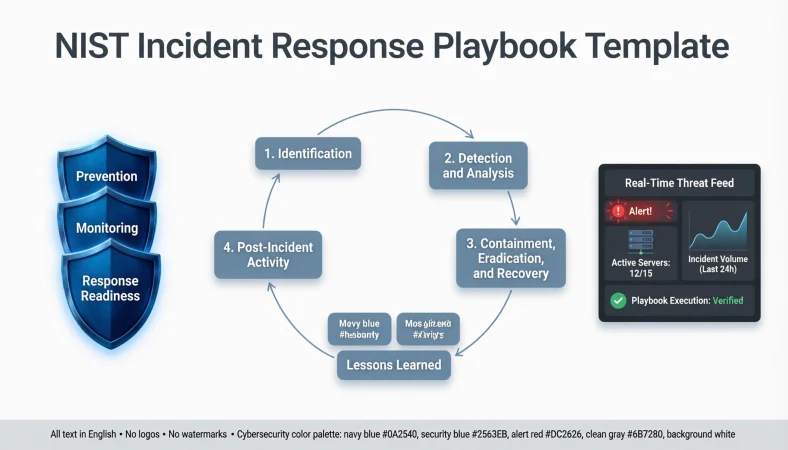
Quick Answer: A NIST incident response playbook template is a structured guide that helps organizations prepare for, detect, respond to, and recover from cybersecurity incidents. It provides clear procedures, assigned responsibilities, communication steps, and recovery actions so security teams can handle threats consistently.
A cybersecurity incident can turn an ordinary workday into a digital fire drill. One suspicious email, unexpected login, ransomware alert, or compromised server can leave an entire security team asking, “Okay, what’s the plan?” That’s exactly where a NIST incident response playbook template becomes useful.
Instead of scrambling through scattered documents and guessing the next step, organizations can follow a structured process for identifying threats, coordinating teams, containing damage, and restoring normal operations. Whether you’re managing a small business, protecting enterprise infrastructure, or building an information security program, having ready-to-use incident response procedures makes a real difference.
A practical playbook also helps employees understand their responsibilities when every minute matters. Let’s explore useful templates, checklists, scenarios, and response examples that can help your organization prepare for cybersecurity incidents.
What Is a NIST Incident Response Playbook Template?
A NIST incident response playbook template is a reusable document that outlines what an organization should do when a cybersecurity incident occurs.
It translates security policies into practical actions that IT teams, security analysts, incident responders, and management can follow.
A useful playbook typically includes:
- Incident description: What happened and how it was discovered.
- Scope and impact: Which systems, accounts, networks, and data are affected.
- Severity level: How urgently the incident requires attention.
- Assigned responsibilities: Who investigates, approves, communicates, and restores services.
- Containment actions: How to limit further damage.
- Eradication steps: How to remove malicious activity.
- Recovery procedures: How to restore affected systems safely.
- Documentation: What evidence, decisions, and lessons must be recorded.
Important NIST update: As of October 2026, the applicable NIST incident response publication is SP 800-61 Revision 3, finalized on April 3, 2025. It supersedes Revision 2 and aligns incident response with the NIST Cybersecurity Framework 2.0.
CSRC
+1
The following examples are adaptable organizational procedures, not official NIST-prescribed wording.
NIST Incident Response Playbook Template: Basic Responses
These foundational statements are useful when creating a general-purpose cybersecurity incident response document.
1. Incident detected and reported. Example: Use this when an employee reports suspicious activity on a company workstation. Meaning: Confirms that a potential security incident has entered the reporting process.
2. Security investigation initiated. Example: Use this when the security team begins reviewing an unexpected login alert. Meaning: Indicates that an initial investigation is underway.
3. Incident assigned to the response team. Example: Use this when a security analyst needs to take ownership of a reported threat. Meaning: Establishes responsibility for investigating and managing the incident.
4. Affected systems identified. Example: Use this when determining which servers or endpoints may be compromised. Meaning: Defines the technical scope of the incident.
5. Initial severity assessment completed. Example: Use this after reviewing the potential impact of a malware detection. Meaning: Establishes an initial understanding of the incident’s seriousness.
6. Evidence preservation initiated. Example: Use this when collecting relevant logs before making system changes. Meaning: Helps protect information needed for investigation.
7. Incident response procedures activated. Example: Use this when a confirmed security incident requires coordinated action. Meaning: Starts the organization’s documented response process.
8. Relevant stakeholders notified. Example: Use this when management and IT teams need an incident update. Meaning: Ensures the appropriate people receive important information.
9. Containment strategy approved. Example: Use this before isolating an affected production server. Meaning: Confirms that the proposed containment action has authorization.
10. Security controls reviewed. Example: Use this when checking firewall rules and endpoint protection settings. Meaning: Identifies security gaps that may have contributed to the incident.
Funny Incident Response Status Messages
A little humor can make internal security updates more approachable, provided the situation is not serious and the wording does not minimize actual risks.
1. The firewall is having a busy day. Example: Use this for an informal internal update during increased suspicious network activity. Meaning: Communicates that the security team is handling unusual traffic.
2. Suspicious activity has entered the chat. Example: Use this when an unexpected security alert appears. Meaning: Adds personality to a notification about a potential threat.
3. Our security team is on detective duty. Example: Use this when analysts are investigating an unusual login. Meaning: Communicates that investigation activities are underway.
4. The suspicious login did not get an invitation. Example: Use this when reviewing an unauthorized access attempt. Meaning: Highlights an access event that requires investigation.
5. Incident response mode is activated. Example: Use this in a casual team channel when response procedures begin. Meaning: Signals that the security team is taking action.
6. The network needs a little investigation time. Example: Use this when an unusual connection requires technical review. Meaning: Explains why additional investigation is necessary.
7. Our logs have some interesting stories today. Example: Use this when analysts discover unusual patterns in system logs. Meaning: Indicates that security monitoring has identified something worth reviewing.
8. Access permissions are getting a reality check. Example: Use this during an account permission review. Meaning: Communicates that access privileges are being examined.
9. The alert deserves our full attention. Example: Use this when a monitoring system generates a potentially important notification. Meaning: Encourages the team to investigate rather than ignore the alert.
10. Backups are getting their moment to shine. Example: Use this during a routine backup verification after an incident. Meaning: Highlights the importance of reliable recovery copies.
Professional Incident Response Statements
Professional language is essential when communicating with executives, clients, auditors, and external partners.
1. The security incident is currently under investigation. Example: Use this in an official update to department leadership. Meaning: Confirms that the organization is examining the reported event.
2. The response team has initiated the appropriate procedures. Example: Use this after activating the incident management process. Meaning: Confirms that established response procedures are being followed.
3. The potential impact is being assessed. Example: Use this when the full scope of an incident remains unknown. Meaning: Explains that investigators are evaluating possible consequences.
4. Containment measures are being implemented. Example: Use this when restricting affected systems or accounts. Meaning: Communicates that steps are being taken to limit further damage.
5. Relevant evidence is being preserved. Example: Use this when forensic information is being collected. Meaning: Confirms that investigation materials are being protected.
6. System integrity is being evaluated. Example: Use this when checking whether affected infrastructure can be trusted. Meaning: Indicates that technical validation is underway.
7. Stakeholders will receive updates through approved channels. Example: Use this during an ongoing enterprise security incident. Meaning: Establishes a controlled communication process.
8. Recovery activities will follow established procedures. Example: Use this when planning the restoration of affected services. Meaning: Communicates that recovery will follow documented requirements.
9. The incident has been recorded for formal review. Example: Use this when adding an event to the incident management register. Meaning: Confirms that the event has an official record.
10. Additional investigation is required before closure. Example: Use this when suspicious activity has not been fully explained. Meaning: Prevents premature incident closure.
Emergency Incident Response Messages
These statements help teams communicate clearly when an incident requires urgent attention.
1. Activate the incident response team immediately. Example: Use this when a critical security event is confirmed. Meaning: Requests immediate coordination among designated responders.
2. Escalate the incident to the security lead. Example: Use this when an event exceeds the authority of the initial analyst. Meaning: Moves the issue to an appropriate decision-maker.
3. Isolate the affected endpoint according to approved procedures. Example: Use this when a workstation shows confirmed malicious activity. Meaning: Limits potential communication between a compromised device and other systems.
4. Restrict the compromised account. Example: Use this when unauthorized account activity is confirmed. Meaning: Prevents further use of the affected credentials.
5. Preserve volatile evidence before shutdown when feasible. Example: Use this when forensic investigators need information stored in system memory. Meaning: Helps prevent the loss of valuable investigation evidence.
6. Verify the scope of affected infrastructure. Example: Use this when an incident may involve multiple servers. Meaning: Determines which assets require attention.
7. Initiate the business continuity procedure. Example: Use this when an incident disrupts essential business operations. Meaning: Helps maintain critical organizational functions.
8. Notify authorized leadership immediately. Example: Use this when an incident meets the organization’s escalation criteria. Meaning: Ensures that responsible decision-makers are informed.
9. Review potential data exposure. Example: Use this when unauthorized access may involve sensitive information. Meaning: Determines whether organizational data may have been compromised.
10. Confirm backup availability and integrity. Example: Use this before beginning a major restoration activity. Meaning: Checks whether recovery resources are usable.
Ransomware Incident Response Statements
Ransomware playbooks should cover detection, isolation, evidence preservation, recovery, and appropriate escalation.
1. Ransomware indicators have been detected. Example: Use this when endpoint monitoring identifies suspicious file encryption behavior. Meaning: Records a potential ransomware-related security event.
2. Potentially affected devices are being isolated. Example: Use this when confirmed malicious activity requires network containment. Meaning: Helps prevent further spread across connected systems.
3. Encryption activity is being investigated. Example: Use this when multiple files suddenly become inaccessible. Meaning: Directs analysts to establish the nature of the activity.
4. Backup repositories are being protected. Example: Use this when ransomware may threaten recovery infrastructure. Meaning: Prioritizes protecting available recovery resources.
5. Unauthorized access pathways are being examined. Example: Use this when investigating how attackers entered the environment. Meaning: Helps identify the initial access method.
6. Ransomware-related evidence is being preserved. Example: Use this when collecting suspicious files, logs, and forensic artifacts. Meaning: Protects materials needed for further analysis.
7. Privileged credentials are under review. Example: Use this when attackers may have obtained administrator access. Meaning: Helps identify and address potentially compromised credentials.
8. Business-critical services are being prioritized. Example: Use this when ransomware disrupts essential operations. Meaning: Focuses recovery planning on important organizational services.
9. Restoration will use verified recovery sources. Example: Use this when rebuilding affected servers from trusted backups. Meaning: Reduces the risk of restoring compromised systems.
10. The incident has been escalated for executive review. Example: Use this when ransomware causes substantial operational disruption. Meaning: Ensures leadership involvement in important decisions.
Phishing Incident Response Statements
Phishing playbooks help security teams respond to malicious emails, suspicious attachments, credential theft, and impersonation attempts.
1. The reported email has been classified as suspicious. Example: Use this when an employee forwards an unexpected email for inspection. Meaning: Records the initial assessment of a potentially malicious message.
2. Email headers are being analyzed. Example: Use this when investigating the sender and delivery path. Meaning: Helps determine whether the message is authentic or deceptive.
3. The suspicious attachment is being examined safely. Example: Use this when a reported message contains an unexpected document. Meaning: Supports controlled analysis without exposing production systems.
4. The sender domain is under investigation. Example: Use this when an email appears to impersonate a trusted organization. Meaning: Helps identify possible domain spoofing or impersonation.
5. Affected recipients are being identified. Example: Use this when a malicious campaign may have reached multiple employees. Meaning: Determines the scope of potential exposure.
6. The malicious message is being removed where authorized. Example: Use this when a phishing campaign has reached employee inboxes. Meaning: Reduces the likelihood of additional users interacting with the message.
7. Potentially exposed credentials are being secured. Example: Use this when a user enters login details on a fraudulent website. Meaning: Addresses possible account compromise.
8. Multi-factor authentication activity is being reviewed. Example: Use this when investigating suspicious authentication attempts. Meaning: Helps identify unusual access behavior.
9. The incident has been escalated for further analysis. Example: Use this when the email appears connected to a broader attack. Meaning: Requests additional investigation and oversight.
10. Employees are receiving a security notification. Example: Use this when other staff members may have received the same phishing email. Meaning: Helps prevent further interaction with the threat.
Data Breach Incident Response Statements
A data breach playbook should address unauthorized access, potential exposure, evidence collection, privacy considerations, and required notifications.
1. Potential data exposure has been identified. Example: Use this when monitoring detects unusual access to a customer database. Meaning: Records a possible compromise involving organizational information.
2. The affected data repository is under investigation. Example: Use this when an unauthorized database query is detected. Meaning: Focuses investigation on the potentially affected data source.
3. Access permissions are being reviewed. Example: Use this when an employee account accesses restricted information unexpectedly. Meaning: Helps identify inappropriate or compromised access privileges.
4. The potential exposure period is being established. Example: Use this when investigators need to determine when unauthorized access began. Meaning: Helps define the timeline of the suspected breach.
5. Data integrity checks are being performed. Example: Use this when investigators suspect unauthorized changes to business records. Meaning: Determines whether information has been modified.
6. Affected information categories are being identified. Example: Use this when determining whether customer, employee, or financial records were involved. Meaning: Establishes what types of information may be exposed.
7. Privacy stakeholders have been notified. Example: Use this when a potential personal information breach meets internal escalation criteria. Meaning: Brings privacy specialists into the investigation.
8. Evidence related to unauthorized access is being preserved. Example: Use this when collecting database audit records and authentication logs. Meaning: Protects important forensic information.
9. External notification requirements are being evaluated. Example: Use this when an incident may trigger legal or contractual reporting duties. Meaning: Helps determine which notification obligations apply.
10. Unauthorized access pathways are being addressed. Example: Use this when investigators identify an exploited application vulnerability. Meaning: Focuses corrective action on the source of unauthorized access.
Malware Incident Response Statements
These statements are useful when responding to malicious software, suspicious processes, infected endpoints, and unauthorized system changes.
1. Malware detection has triggered an investigation. Example: Use this when endpoint security identifies a suspicious executable. Meaning: Starts the review of a potential malware infection.
2. The affected device is being assessed. Example: Use this when an endpoint displays unusual processes or behavior. Meaning: Determines the extent of possible compromise.
3. Suspicious processes are being analyzed. Example: Use this when investigating unexpected background activity. Meaning: Helps establish whether malicious code is running.
4. Malware indicators are being collected. Example: Use this when recording file hashes, network connections, and process details. Meaning: Builds evidence for threat identification.
5. Endpoint isolation is being considered. Example: Use this when a workstation may communicate with malicious infrastructure. Meaning: Evaluates an appropriate containment action.
6. Persistence mechanisms are being investigated. Example: Use this when malware may restart automatically after reboot. Meaning: Identifies methods that could allow malicious activity to continue.
7. Security signatures are being reviewed. Example: Use this when checking whether detection rules identify the observed threat. Meaning: Evaluates the effectiveness of malware detection controls.
8. Unauthorized scheduled tasks are being examined. Example: Use this when suspicious programs appear to execute repeatedly. Meaning: Helps identify possible malware persistence.
9. The malware infection scope is being established. Example: Use this when similar alerts appear across several endpoints. Meaning: Determines how widely the threat may have spread.
10. Affected systems are undergoing remediation. Example: Use this after investigators determine the required removal actions. Meaning: Describes efforts to eliminate malicious software.
Network Security Incident Responses
Network incident playbooks address unauthorized connections, unusual traffic, denial-of-service activity, firewall changes, and suspicious communication patterns.
1. Unusual network traffic has been detected. Example: Use this when monitoring identifies unexpected outbound connections. Meaning: Records a network behavior that requires investigation.
2. The source and destination addresses are being reviewed. Example: Use this when analyzing communication with an unfamiliar external server. Meaning: Helps identify potentially suspicious network endpoints.
3. Firewall configurations are being examined. Example: Use this when investigating unexpected changes to network access rules. Meaning: Checks whether firewall settings contributed to the incident.
4. Network segmentation controls are being evaluated. Example: Use this when a compromised device may communicate with other network segments. Meaning: Reviews boundaries that help limit unauthorized movement.
5. Suspicious connections are being investigated. Example: Use this when a server communicates with an unknown destination. Meaning: Determines whether the connection is legitimate or malicious.
6. Network logs are being preserved. Example: Use this when collecting records for a security investigation. Meaning: Protects useful information about network activity.
7. Potential lateral movement is being assessed. Example: Use this when an attacker may have moved between internal systems. Meaning: Investigates possible unauthorized movement within the network.
8. Network access restrictions are being reviewed. Example: Use this when evaluating whether compromised assets require isolation. Meaning: Helps limit unauthorized network communication.
9. Denial-of-service indicators are being analyzed. Example: Use this when a service experiences unusually high traffic volumes. Meaning: Determines whether availability problems may involve malicious activity.
10. Network services are undergoing security validation. Example: Use this after resolving suspicious network behavior. Meaning: Checks whether affected services can operate securely.
Cloud Security Incident Response Statements
Cloud environments introduce additional considerations involving identity permissions, storage access, virtual infrastructure, and service-provider coordination.
1. An unusual cloud access event has been detected. Example: Use this when a cloud account logs in from an unexpected location. Meaning: Records a potentially suspicious cloud authentication event.
2. Cloud identity permissions are being reviewed. Example: Use this when an account has unexpected administrative privileges. Meaning: Identifies potentially excessive or compromised permissions.
3. Cloud audit logs are being preserved. Example: Use this when investigating unauthorized changes to cloud resources. Meaning: Protects records of cloud account and resource activity.
4. Exposed storage permissions are being assessed. Example: Use this when a storage bucket may be publicly accessible. Meaning: Determines whether cloud-stored information is improperly exposed.
5. Suspicious API activity is under investigation. Example: Use this when monitoring identifies unexpected API requests. Meaning: Reviews possible unauthorized use of cloud interfaces.
6. Compromised cloud credentials are being addressed. Example: Use this when investigators confirm unauthorized account access. Meaning: Supports actions to secure affected credentials.
7. Cloud resource modifications are being reviewed. Example: Use this when an unfamiliar configuration change appears in an audit log. Meaning: Identifies potentially unauthorized infrastructure changes.
8. Third-party cloud support is being coordinated. Example: Use this when an incident requires assistance from a cloud provider. Meaning: Establishes communication with the relevant service provider.
9. Cloud workload integrity is being validated. Example: Use this when checking whether virtual machines or containers were modified. Meaning: Determines whether affected workloads remain trustworthy.
10. Unnecessary cloud permissions are being restricted. Example: Use this when excessive privileges increase incident exposure. Meaning: Reduces unnecessary access to cloud resources.
Short Incident Response Checklist Statements
Short, action-oriented statements are useful in SOC dashboards, ticketing systems, response checklists, and incident tracking documents.
1. Alert received and recorded. Example: Use this when creating an incident ticket. Meaning: Confirms that the alert has been entered into the tracking system.
2. Incident owner assigned. Example: Use this when allocating investigation responsibility. Meaning: Identifies the person responsible for coordinating the incident.
3. Severity level established. Example: Use this after evaluating the initial business and technical impact. Meaning: Records the assigned incident priority.
4. Affected assets identified. Example: Use this after reviewing endpoint and server alerts. Meaning: Lists systems potentially involved in the incident.
5. Investigation evidence preserved. Example: Use this when securing relevant logs and forensic records. Meaning: Confirms that important evidence has been retained.
6. Escalation requirements checked. Example: Use this when deciding whether additional teams must be notified. Meaning: Ensures that escalation criteria are considered.
7. Containment actions authorized. Example: Use this before making significant infrastructure changes. Meaning: Confirms the required approval has been obtained.
8. Threat activity investigated. Example: Use this when examining suspicious system behavior. Meaning: Records that technical analysis has taken place.
9. Remediation completed. Example: Use this after removing the identified threat. Meaning: Indicates that planned corrective actions have been performed.
10. Recovery validated. Example: Use this after checking restored services and systems. Meaning: Confirms that recovery testing has been completed.
11. Incident report prepared. Example: Use this when preparing a summary for management. Meaning: Records the investigation and response findings.
12. Lessons learned recorded. Example: Use this during the post-incident review. Meaning: Captures improvements for future response activities.
Creative Incident Response Playbook Ideas
A good playbook should be easy to navigate, understandable under pressure, and practical for different security scenarios.
1. Build a scenario-based response library. Example: Use this when creating separate procedures for phishing, ransomware, and data breaches. Meaning: Organizes instructions according to incident type.
2. Create a one-page emergency response sheet. Example: Use this when employees need immediate reporting instructions. Meaning: Makes essential information easier to find.
3. Add decision trees to investigation procedures. Example: Use this when analysts need guidance on escalation decisions. Meaning: Provides a visual path through important response choices.
4. Introduce severity-based response checklists. Example: Use this when different incidents require different levels of urgency. Meaning: Helps standardize incident prioritization.
5. Include a stakeholder communication matrix. Example: Use this when several departments must coordinate during an incident. Meaning: Clarifies who should receive specific updates.
6. Maintain a dedicated evidence register. Example: Use this when documenting collected forensic materials. Meaning: Improves evidence organization and accountability.
7. Create role-specific response instructions. Example: Use this when technical analysts and executives have different responsibilities. Meaning: Makes procedures relevant to each participant.
8. Add recovery verification checkpoints. Example: Use this when restoring business-critical applications. Meaning: Ensures that recovery includes security and functionality checks.
9. Include an incident communication timeline. Example: Use this when planning internal and external status updates. Meaning: Establishes when communication activities should occur.
10. Develop tabletop exercise scenarios. Example: Use this when testing how teams respond to a simulated ransomware incident. Meaning: Helps identify gaps without requiring a real security event.
11. Create a lessons-learned action tracker. Example: Use this when assigning improvements after an incident review. Meaning: Turns investigation findings into measurable follow-up activities.
12. Schedule regular playbook reviews. Example: Use this when infrastructure, personnel, or security requirements change. Meaning: Keeps response procedures aligned with organizational needs.
Confident Incident Response Statements
Confidence in incident communication comes from clear ownership, verified facts, and specific next steps.
1. The incident is being managed through established procedures. Example: Use this when informing leadership that response activities are underway. Meaning: Communicates structured incident management.
2. Our response team has established incident ownership. Example: Use this when assigning a dedicated incident coordinator. Meaning: Demonstrates accountability.
3. We are prioritizing the protection of critical assets. Example: Use this when coordinating a major infrastructure incident. Meaning: Communicates a focus on essential organizational resources.
4. All response actions are being documented. Example: Use this when maintaining an official incident activity record. Meaning: Emphasizes accountability and traceability.
5. Recovery decisions will be based on verified information. Example: Use this when determining whether systems are ready for restoration. Meaning: Avoids unsupported assumptions during recovery.
6. The investigation is following an approved escalation process. Example: Use this when explaining how a critical incident is being managed. Meaning: Confirms that reporting and decision-making follow organizational requirements.
7. The affected environment is undergoing security validation. Example: Use this when checking systems after remediation. Meaning: Demonstrates that technical verification is part of the response.
8. We are coordinating technical and business priorities. Example: Use this when an incident affects several departments. Meaning: Balances security requirements with operational needs.
9. Identified security gaps are being addressed. Example: Use this when implementing corrective actions. Meaning: Communicates a commitment to reducing weaknesses.
10. Incident progress is being reviewed against response objectives. Example: Use this during an executive status meeting. Meaning: Connects response activities to defined goals.
Sarcastic but Professional Incident Response Messages
A little dry humor can work in private team discussions, training sessions, and low-risk situations. Keep official reports factual.
1. That login attempt needs a second opinion. Example: Use this when an unfamiliar authentication event requires investigation. Meaning: Highlights uncertainty about the legitimacy of an access attempt.
2. The firewall has noticed something interesting. Example: Use this when unusual traffic triggers a monitoring alert. Meaning: Draws attention to an unexpected network event.
3. Someone forgot to read the access policy. Example: Use this when reviewing an apparent access control violation. Meaning: Highlights the importance of following access requirements.
4. Unexpected administrator privileges are never boring. Example: Use this when an account receives unexplained elevated permissions. Meaning: Emphasizes the need to investigate privilege changes.
5. Our logs are asking some difficult questions. Example: Use this when reviewing unusual authentication patterns. Meaning: Suggests that recorded activity requires further examination.
6. That attachment is not winning any trust awards. Example: Use this when a suspicious email attachment is reported. Meaning: Encourages caution around an unverified file.
7. The server has some explaining to do. Example: Use this when unexpected server activity appears in monitoring. Meaning: Indicates that further technical investigation is necessary.
8. The access list needs a reality check. Example: Use this when reviewing excessive user permissions. Meaning: Encourages a review of authorization settings.
9. That configuration change deserves documentation. Example: Use this when an unexpected infrastructure modification appears. Meaning: Highlights the importance of recording and investigating changes.
10. The alert is not going to investigate itself. Example: Use this when assigning a pending security alert. Meaning: Encourages prompt ownership and investigation.
Calm and Reassuring Incident Response Messages
These statements help communicate a measured response without making unsupported promises about the incident’s outcome.
1. The situation is being assessed carefully. Example: Use this when employees request an update about a reported security issue. Meaning: Communicates that the organization is evaluating available information.
2. The appropriate response team has been notified. Example: Use this after receiving a confirmed incident report. Meaning: Reassures stakeholders that responsible personnel are aware.
3. We are reviewing the available evidence. Example: Use this when investigators are still establishing what happened. Meaning: Shows that conclusions will be based on investigation findings.
4. Critical services are being monitored. Example: Use this when an incident may affect business operations. Meaning: Communicates continued oversight of essential systems.
5. Updates will be shared as information is verified. Example: Use this when stakeholders need regular incident communication. Meaning: Promotes accurate and responsible updates.
6. Recovery planning is underway. Example: Use this when affected services require restoration. Meaning: Confirms that the organization is preparing recovery activities.
7. The investigation remains active. Example: Use this when the incident has not yet been fully resolved. Meaning: Makes the current investigation status clear.
8. Security measures are being reviewed. Example: Use this when assessing possible weaknesses after an incident. Meaning: Communicates that relevant controls are under evaluation.
9. The response team is coordinating the next steps. Example: Use this when several technical teams are involved. Meaning: Indicates that response activities are being organized.
10. Evidence collection is proceeding according to procedure. Example: Use this when forensic work is underway. Meaning: Communicates a controlled evidence-handling process.
NIST Incident Response Documentation Statements
Documentation is essential for maintaining an accurate incident record and supporting audits, investigations, and organizational learning.
1. The incident identification details have been recorded. Example: Use this when creating the initial incident report. Meaning: Captures when and how the event was discovered.
2. The detection source has been documented. Example: Use this when recording whether an alert came from an employee or monitoring system. Meaning: Identifies how the organization became aware of the incident.
3. Relevant timestamps have been verified. Example: Use this when correlating activity across different system logs. Meaning: Establishes an accurate event timeline.
4. Evidence collection activities have been recorded. Example: Use this when maintaining forensic investigation notes. Meaning: Documents how evidence was obtained and handled.
5. Incident severity justification has been documented. Example: Use this when explaining the assigned priority level. Meaning: Provides a basis for incident classification.
6. Response approvals have been retained. Example: Use this when recording authorization for containment or recovery actions. Meaning: Establishes decision-making accountability.
7. Stakeholder notifications have been logged. Example: Use this when recording incident communication activities. Meaning: Creates a record of who was notified and when.
8. Technical findings have been summarized. Example: Use this when preparing an investigation report. Meaning: Presents the important technical conclusions.
9. Recovery verification results have been attached. Example: Use this when documenting restoration testing. Meaning: Provides evidence that recovery checks were performed.
10. Corrective actions have been assigned. Example: Use this when creating a follow-up improvement register. Meaning: Identifies responsibility for addressing discovered weaknesses.
11. Incident closure approval has been recorded. Example: Use this when completing the formal incident closure process. Meaning: Documents authorization to close the case.
12. The final incident report has been archived. Example: Use this when storing completed incident documentation. Meaning: Preserves the official record for future reference.
Sweet and Supportive Incident Response Messages
Security incidents can create pressure across technical and business teams. Supportive language helps maintain coordination and encourage timely reporting.
1. Thank you for reporting the suspicious activity. Example: Use this when an employee reports an unusual email. Meaning: Appreciates proactive security awareness.
2. Your report has been received and recorded. Example: Use this when acknowledging a new incident ticket. Meaning: Confirms that the report has entered the response process.
3. Your cooperation helps protect our systems. Example: Use this when requesting additional details from an employee. Meaning: Reinforces the importance of teamwork in cybersecurity.
4. The security team is reviewing your report. Example: Use this when responding to an employee who reports a suspicious login. Meaning: Explains that the reported issue is being assessed.
5. Please avoid interacting with the suspicious file. Example: Use this when an employee reports an unexpected attachment. Meaning: Provides a clear precaution while investigation proceeds.
6. We appreciate your patience during the investigation. Example: Use this when a security review temporarily affects access to a service. Meaning: Acknowledges the inconvenience caused by response activities.
7. Your observations are valuable to the investigation. Example: Use this when requesting details about a suspected phishing email. Meaning: Encourages employees to share relevant information.
8. We are coordinating the next steps with the appropriate teams. Example: Use this when explaining a multi-department response. Meaning: Shows that incident management involves the right stakeholders.
9. Thank you for following the security reporting procedure. Example: Use this when an employee reports a lost company device. Meaning: Recognizes responsible security behavior.
10. We will share verified updates when available. Example: Use this when employees ask about an ongoing incident. Meaning: Sets a clear expectation for communication.
Clever Incident Response Communication Statements
Clever communication makes complicated security activities easier to understand without sacrificing accuracy.
1. Detect first, investigate with evidence. Example: Use this as a reminder during SOC training. Meaning: Encourages analysts to validate alerts before drawing conclusions.
2. Containment is a step, not the finish line. Example: Use this during incident response exercises. Meaning: Reminds responders that eradication and recovery remain necessary.
3. Every alert deserves the right level of attention. Example: Use this when discussing incident prioritization. Meaning: Encourages risk-based alert handling.
4. Good documentation makes future investigations easier. Example: Use this during incident management training. Meaning: Highlights the long-term value of accurate records.
5. Recovery without validation is an unfinished job. Example: Use this when discussing restoration procedures. Meaning: Emphasizes security checks before returning systems to service.
6. A clear owner prevents a confusing response. Example: Use this when assigning incident responsibilities. Meaning: Highlights the importance of accountability.
7. One suspicious event can reveal a larger pattern. Example: Use this when investigating connected security alerts. Meaning: Encourages analysts to examine relationships between events.
8. Strong communication supports strong containment. Example: Use this during a cross-functional incident exercise. Meaning: Explains why timely coordination matters.
9. A tested backup is more useful than an assumed backup. Example: Use this during disaster recovery planning. Meaning: Encourages regular verification of recovery resources.
10. Security improvements should outlast the incident. Example: Use this during post-incident planning. Meaning: Connects incident findings with long-term security improvements.
11. Preparation reduces confusion when pressure rises. Example: Use this when introducing an incident response playbook. Meaning: Highlights the value of documented procedures.
12. Learn from every incident, not just major ones. Example: Use this during a security team retrospective. Meaning: Encourages continuous improvement across all incident categories.
Emotional and Team-Focused Incident Response Messages
These messages are appropriate for team meetings, internal updates, and post-incident discussions where collaboration matters.
1. Every team member has a role in incident response. Example: Use this when introducing responsibilities during a tabletop exercise. Meaning: Reinforces shared accountability.
2. Clear communication helps everyone stay aligned. Example: Use this when several teams are handling the same incident. Meaning: Encourages coordinated decision-making.
3. Reporting a concern early is always valuable. Example: Use this during employee security awareness training. Meaning: Encourages people to report suspicious behavior promptly.
4. No incident report should be dismissed without review. Example: Use this when explaining the importance of reporting procedures. Meaning: Supports a responsible reporting culture.
5. Our response depends on accurate information. Example: Use this when asking teams to provide investigation details. Meaning: Highlights the importance of reliable evidence.
6. We improve by reviewing what happened. Example: Use this during a post-incident review meeting. Meaning: Encourages learning instead of assigning blame.
7. Collaboration keeps the response moving forward. Example: Use this when technical and management teams must coordinate. Meaning: Recognizes the value of teamwork.
8. Every documented action contributes to accountability. Example: Use this when encouraging detailed incident records. Meaning: Connects documentation with responsible decision-making.
9. Security awareness starts with everyday actions. Example: Use this during an employee training session. Meaning: Shows how routine behavior supports organizational security.
10. Recovery is a shared organizational responsibility. Example: Use this when business departments participate in restoration. Meaning: Highlights cross-functional involvement.
11. Lessons learned help us prepare for tomorrow. Example: Use this when presenting improvement actions. Meaning: Connects experience with future readiness.
12. A prepared team responds with greater clarity. Example: Use this when encouraging participation in incident response exercises. Meaning: Reinforces the value of practice and preparation.
NIST Incident Response Playbook Template: Practical Copy-and-Use Format
Beyond the 180 communication examples, organizations need a practical document that responders can complete during a real incident. The following reusable structure can serve as a starting point.
Incident Identification
| Field | Information to complete |
| Incident ID | IR−2026−001IR-2026-001 |
| Incident name | DescribetheincidentDescribe the incident |
| Date and time detected | YYYY−MM−DDHH:MMUTCYYYY-MM-DD HH:MM UTC |
| Detection source | SIEM,EDR,employeereport,etc.SIEM, EDR, employee report, etc. |
| Incident coordinator | NameandroleName and role |
| Incident category | Phishing,malware,ransomware,breach,etc.Phishing, malware, ransomware, breach, etc. |
| Initial severity | Critical,High,Medium,LowCritical, High, Medium, Low |
| Current status | Open,Investigating,Contained,Recovering,ClosedOpen, Investigating, Contained, Recovering, Closed |
Incident Assessment
- What happened?
- When was the suspicious activity first detected?
- Which systems or accounts are affected?
- Is sensitive information potentially exposed?
- Is the incident still active?
- Are other business services affected?
- What evidence is currently available?
- Does the incident require escalation?
Response Responsibilities
| Role | Responsibility |
| Incident commander | Coordinates response decisions |
| SOC analyst | Reviews alerts and investigates activity |
| IT administrator | Supports technical containment and recovery |
| Forensic investigator | Collects and analyzes evidence |
| Legal representative | Reviews legal and contractual obligations |
| Privacy officer | Evaluates personal data exposure |
| Communications lead | Coordinates approved communications |
| Executive sponsor | Provides management oversight |
Response Action Checklist
- Record the incident and assign an owner.
- Confirm the incident classification.
- Assess technical and business impact.
- Preserve relevant evidence.
- Notify required stakeholders.
- Approve and implement containment actions.
- Investigate the initial access method.
- Remove malicious activity.
- Validate affected systems.
- Restore services using trusted resources.
- Monitor for recurring suspicious activity.
- Prepare the final incident report.
- Complete the lessons-learned review.
Incident Closure Report
| Field | Details |
| Root cause | ConfirmedorsuspectedcauseConfirmed or suspected cause |
| Affected assets | Systems,accounts,applicationsSystems, accounts, applications |
| Business impact | OperationalandfinancialimpactOperational and financial impact |
| Containment summary | ActionscompletedActions completed |
| Eradication summary | ThreatremovalactionsThreat removal actions |
| Recovery summary | RestorationandvalidationRestoration and validation |
| Lessons learned | IdentifiedimprovementsIdentified improvements |
| Outstanding actions | ResponsibleownerandduedateResponsible owner and due date |
| Closure approval | AuthorizedreviewerAuthorized reviewer |
| Closure date | YYYY−MM−DDYYYY-MM-DD |
Template note: Adapt severity definitions, response deadlines, evidence-handling requirements, escalation authorities, and notification rules to your organization’s risk profile and applicable obligations.
FAQs
What Does a NIST Incident Response Playbook Template Mean?
It is a reusable guide for managing cybersecurity incidents using documented procedures and responsibilities.
What Is the Purpose of an Incident Response Playbook?
It helps security teams identify threats, contain damage, investigate incidents, and restore affected systems.
Is a NIST Incident Response Playbook Suitable for Professional Use?
Yes. Organizations can adapt playbooks for SOC teams, IT departments, security managers, and incident responders.
What Should You Include If You Do Not Have a Complete Incident Response Plan?
Start with incident reporting, team responsibilities, severity levels, containment steps, recovery procedures, and documentation.
Is Humor Appropriate in an Incident Response Playbook?
Keep humor for training and informal team communication. Actual incident instructions should remain clear and professional.
Is NIST SP 800-61 Revision 2 Still the Current Version?
No. NIST SP 800-61 Revision 3, published in April 2025, supersedes Revision 2.
What Are the Main Elements of a Cybersecurity Incident Response Plan?
The main elements include preparation, detection, analysis, containment, eradication, recovery, and continuous improvement.
What Types of Incidents Need Separate Playbooks?
Common examples include phishing, ransomware, malware, data breaches, cloud compromises, and network intrusions.
How Often Should an Incident Response Playbook Be Updated?
Review it regularly and whenever significant changes occur in systems, threats, responsibilities, or compliance requirements.
What Is the Difference Between an Incident Response Plan and a Playbook?
A plan establishes the overall response strategy, while a playbook provides actionable instructions for specific scenarios.
Can Small Businesses Use NIST Incident Response Templates?
Yes. Small businesses can adapt simplified procedures based on their resources, technology, and operational risks.
Why Is a Post-Incident Review Important?
It identifies response gaps, documents lessons learned, and helps prevent similar incidents in the future.
Conclusion
A well-structured NIST incident response playbook template can make cybersecurity management more organized, predictable, and effective. From phishing emails and ransomware attacks to cloud security incidents and potential data breaches, having documented procedures helps teams understand their responsibilities and take appropriate action. Remember, a playbook should not just look impressive in a folder.
It should be practical, regularly tested, and easy to follow when an actual incident occurs. Start with the templates and examples in this guide, customize them for your organization, and involve the people responsible for security and recovery. Save this guide, share it with your security team, and keep improving your incident response strategy.